My first iOS apps are on TestFlight — and NeuroBirds is going mobile

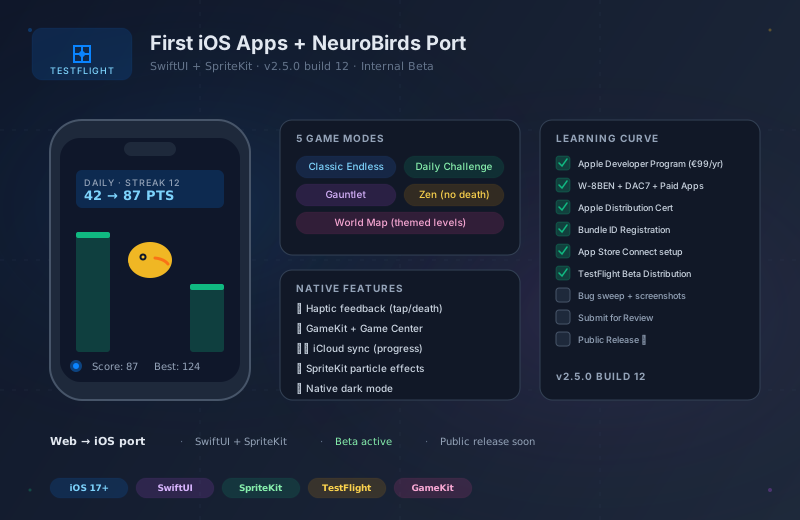
After months of learning curve trying to navigate the Apple ecosystem with the brain of a web developer, it’s finally happening: my first iOS apps are in TestFlight beta distribution. Friends are testing them right now. And the highlight: my browser game NeuroBirds has been fully ported to iOS and is just before release.
The learning curve nobody talks about
As a web developer, I thought iOS would be “just another platform”. SwiftUI is declarative like React, Xcode is an IDE, and I knew the concept of app distribution from npm.
Wrong. The Apple ecosystem is its own planet with its own culture, its own bureaucracy, and its own language. What I’ve learned over the past months (often the hard way):
€99 per year, payment via German tax address — linking tax ID, German national ID, and Apple ID can take days, with verification calls coming from the US.
Before you can offer anything on TestFlight or the Store, you have to accept the "Paid Apps Agreement". Plus W-8BEN for US withholding tax exemption. Plus DAC7 for EU market participation. Three separate agreements, each with their own edge cases.
Apple Development Certificate, Apple Distribution Certificate, Provisioning Profile per Bundle ID, App ID Registration — and if you accidentally had CODE_SIGN_STYLE on Manual just once in the Release configuration, you cannot upload to TestFlight.
A Bundle ID must be registered in the Apple Developer Portal BEFORE it appears in App Store Connect. If it doesn't show up in the dropdown: usually a contract issue (Paid Apps missing) or signing config wrong.
Build → Archive → Upload via Xcode or altool → Apple processes (5-30 min) → beta testers get invited → they install TestFlight app → install your app → test → send crash logs back. Per upload, CURRENT_PROJECT_VERSION must be incremented, otherwise Apple silently rejects.
Its own web backend with its own logic. Age rating questionnaire, App Privacy declaration (data protection mandatory per data category), pricing matrix for 175 markets, screenshots in 6 screen sizes. All before you can click "Submit for Review".
NeuroBirds: from browser to iOS
My game NeuroBirds originally ran only in the browser at neurobirds.com — a Flappy-Bird-inspired game with a neuro twist (each bird represents a neuron’s activity, scores change with the game dynamics).
It worked well on the web. But the play feel on a touch screen is different from mouse, and the game deserves a native experience.
So I fully ported it:
SwiftUI for menus, World Map, Settings, Onboarding. SpriteKit for the actual game logic (bird physics, pipes, collision detection, score animation, particle effects on death).
Classic (endless), Daily Challenge (new daily seed), Gauntlet (level-based with difficulty tiers), Zen (no-death mode), World Map (themed level progression). Each mode has its own SpriteKit scene.
iPhone vibrations on tap, death, high score. Web had no access to haptics — on iOS suddenly available and makes the game massively better.
Game Center leaderboards (planned for post-release), achievements, cloud save for progress. Web version had localStorage; iOS gets iCloud sync.
What took the most time in the port
The non-obvious difficulties
- Bird ghost between modes
Switching from Classic to Daily to Gauntlet sometimes left the bird as a "ghost" stuck at the screen edge. Root cause: SpriteKit actions were not cleared between scene switches. Fix: removeAllActions() + scale reset on every restartGame().
- World Map vs. startGame
A guard condition with currentLevelId blocked World Map levels after a mode switch. Silent regression — no error message, just "tap does nothing".
- LevelCompleteView edge cases
When a level was completed, the view literally showed "level.complete.title" instead of the localized string, and the bird fell instead of celebrating. Race condition between completing-state and death detection.
- Daily/Gauntlet hang
On-device, the game sporadically hung on tap in Daily/Gauntlet mode. No crash, just frozen. Diagnosed via NSLog telemetry + simctl log show — ultimately a state issue in the tap handler that only triggered under specific race conditions.
- Build number discipline
Every TestFlight upload requires incrementing CURRENT_PROJECT_VERSION. I forgot this twelve times in one session — every forgotten bump = Apple server silently rejects the upload, no error in the Xcode UI.
Current status
NeuroBirds is currently at v2.5.0 Build 12 in internal TestFlight distribution. Friends are actively testing, a few bugs are in the backlog (mostly edge cases in World Map progression), and public release is planned within the next few weeks — once the last bugs are fixed and the screenshots for 6 screen sizes are final.
If you want to test it
If you have iOS and want to join the beta test, write me a quick note — I’m happy to expand the TestFlight list. Requirements: TestFlight app installed, iOS 17+, honest feedback about bugs / improvement suggestions.
Reflection
Entering the iOS world was more frustrating than expected, but also more rewarding. What deploys to the web in an afternoon takes weeks on iOS due to bureaucracy, contracts, signing, reviews. But the end product feels “right” on a different level — native touch, haptics, push notifications, App Store distribution, discovery.
For a web studio expanding into hardware/mobile, the iOS learning curve is paid once. After that, you have a second distribution channel and a second product surface you can own as the Wender Media brand.
The Android equivalent is still pending — next learning curve.
Links:
- neurobirds.com — web version
- TestFlight invitation: contact