Free Icon Generator — launching on Product Hunt

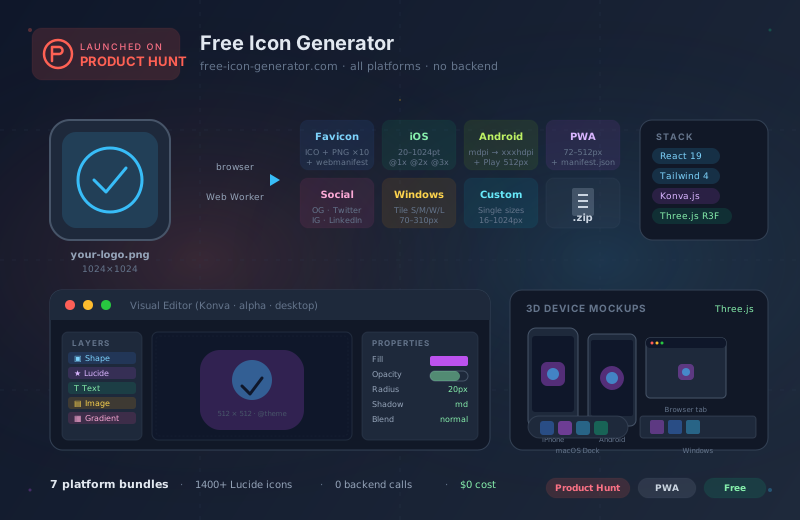
Today I’m launching the Free Icon Generator on Product Hunt. It’s a client-side tool that produces complete icon bundles for every relevant platform from a single image — web, iOS, Android, macOS, Windows, PWA, and social media. No backend, no account, runs entirely in the browser.
The problem
Every time I needed icons for a new project, it was the same annoying workflow: open the logo in Photoshop or Figma, manually export to 16×16, 32×32, 192×192, 512×512, then again for iOS at 20 different sizes with @1x/@2x/@3x, then Android densities (mdpi, hdpi, xhdpi, xxhdpi, xxxhdpi), then write a manifest.json by hand, then generate an ICO file because that’s what the browser wants, then build an Open Graph image at 1200×630, then an Apple Touch Icon at 180×180…
All of that for one logo. Per project.
There are online tools that can do part of this, but they either want money, or an account, or they send your image to someone else’s server. For a logo you haven’t even shipped publicly yet, that’s a strange choice.
So I started building one for myself.
What it does
The generator has two modes: Quick Convert for 90% of cases, and a Visual Editor for designers who want to design icons directly in the tool.
Quick Convert — the primary workflow
On the landing page: drag the image in, pick a format, download a ZIP. Done.
ICO, PNG (16, 32, 48, 64, 96, 128, 192, 256, 384, 512), site.webmanifest — the complete classic web stack.
All sizes from 20pt to 1024pt (App Store), including @1x/@2x/@3x variants and a matching Contents.json.
mdpi, hdpi, xhdpi, xxhdpi, xxxhdpi plus the Play Store icon at 512×512.
All manifest sizes (72, 96, 128, 144, 152, 192, 384, 512) plus generated manifest.json with correct paths.
Open Graph (1200×630), Twitter Card (1200×600), Instagram (1080×1080), LinkedIn banner (1584×396).
Small (70×70), Medium (150×150), Wide (310×150), Large (310×310) for Windows PWA manifests.
Any size from 16 to 1024 pixels — when you only need one specific icon.
The ZIP download contains all files cleanly named and in the folder structure each framework expects. iOS gets an Contents.json you can drop straight into Xcode. PWA gets a ready-to-use manifest.json. Favicons come with the HTML snippets to paste into <head>.
Visual Editor (Alpha, desktop only)
If you don’t want to generate icons from a finished logo but design them directly in the tool, you get a full layer-based editor — built on Konva.js.
Shapes (rectangle, circle, polygon), Lucide icons (1400+ available), text with Google Fonts integration, images, gradients.
Grid, zoom, pan (space + drag), snap-to-grid and snap-to-center, guides, rulers.
Transform, fill and stroke, opacity, blend modes, shadows — everything you know from Figma, focused on icon sizes.
HSL/HEX picker, gradient editor, 5 preset palettes plus your own savable.
Live preview on iPhone, Android, browser tab, macOS dock, and Windows taskbar — rendered with Three.js.
Undo/redo, copy/paste, duplicate, delete, nudge with arrow keys, select all. Like a native editor.
Mobile users get redirected to the Quick Convert landing page — the editor needs screen real estate touch devices don’t have.
Autosave and project files
The editor saves automatically to IndexedDB. On next open, it asks whether to restore the last session. If you want to share or version projects, export them as .icon-project.json and import later.
Stack
A few technical highlights for those curious about what’s under the hood:
Modern React stack with Vite as the build tool. Component-router-free — the whole app is an SPA with useState-based navigation.
CSS-first configuration via @theme blocks. No tailwind.config.js. Custom colors and tokens live in global.css.
Performant 2D canvas with a layer model that maps naturally to icon design. Not to be confused with Fabric.js.
@react-three/fiber + @react-three/drei for the device previews. Rendered in real-time, reacts to editor changes.
Image resizing and ZIP creation runs in a worker so the main thread does not block when you generate 30 sizes at once.
Multilingual support for DE and EN. The tool is available in German and English — language is detected from browser locale.
Everything is client-side. Images never leave your browser. There’s no API endpoint, no database, no hosting for user data. What you upload stays with you.
What’s coming next
Currently alpha. Beta status once multi-select, grouping, and drag-and-drop layer reordering are stable.
Currently the batch converter checks resolution, contrast, and safe zone. Planned: automatic background removal for logos on colored backgrounds.
Apple Watch (38mm, 42mm, 44mm, 49mm), CarPlay, Apple TV. On the roadmap, but only if real users ask for it.
A Node CLI for CI/CD pipelines that does the same thing as the browser generator. Exactly what build tools need.
Support on Product Hunt
If you find the tool useful, an upvote on Product Hunt would mean a lot — the first day is decisive for visibility, and the more people see it today, the more likely it helps someone who needs exactly this workflow right now.
Links:
- free-icon-generator.com — live tool
- Product Hunt — launch page