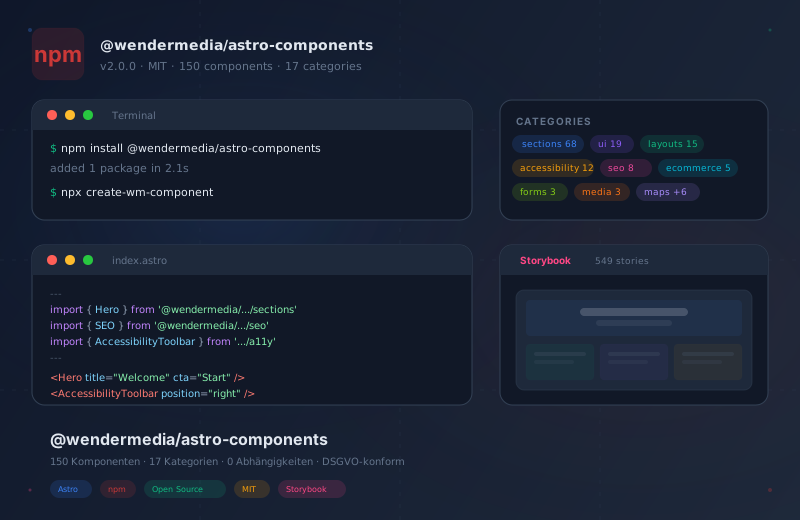
astro-components v2.0 — 150 Components on npm

Today I published @wendermedia/astro-components v2.0 as a public npm package. The library contains 150 Astro components across 17 categories — from accessibility tools to SEO components to complete page sections. Everything built with CSS custom properties, zero external dependencies, GDPR-compliant.
Don’t take my word for it — see for yourself
When evaluating component libraries, nobody wants bullet lists. You want to see how components actually look and behave.
That’s exactly what the live Storybook is for: wm-astro-components.netlify.app
549 stories — every component with interactive controls, different states and variants. Accessibility checks built in. No local install required, no sign-up. Just open and click through.
What’s included?
The 17 categories cover everything you need for a complete Astro website:
SkipLinks, FocusTrap, FontResizer, ThemeToggle, AccessibilityToolbar, TextToSpeech, LiveRegion — everything for WCAG compliance.
Meta tags, JSON-LD, OpenGraph, TwitterCard, Hreflang, Canonical, RichSnippets — structured data for every page.
Hero, CTA, Pricing, FAQ, Team, Testimonials, Timeline, Awards, Blog, Contact — ready-made page sections.
Accordion, Modal, Tabs, Toast, Tooltip, CommandPalette, Drawer, Dropdown — interactive elements with zero runtime.
Bento, Magazine, Dashboard, Portfolio, Newspaper, Split, Landing, Docs — complete page templates.
ProductCard, Cart, Wishlist, QuickView, AddToCart — shopping building blocks without framework lock-in.
Breadcrumbs, MobileNav, Pagination, Sidebar — all with keyboard support and ARIA.
GoogleMap and OpenStreetMap — GDPR-compliant with two-click consent.
VideoPlayer, AudioPlayer, ImageGallery — lazy loading and consent gates included.
Plus forms, content utilities, social components, a design system provider, optimized image components, and a gallery with before/after slider.
This library vs. alternatives
Before committing to a component library, it pays to compare. Here are the three most common approaches:
| Criteria | @wendermedia/astro-components Recommended | Build everything yourself | Other Astro libraries |
|---|---|---|---|
| Components | 150 tested and ready | Unlimited, but self-built | Varies (10–50 typical) |
| Setup time | < 2 minutes | Weeks to months | 5–15 minutes |
| Accessibility | WCAG 2.2 AA compliant | Must be implemented manually | Partial |
| SEO components | 8 dedicated (JSON-LD, OG, etc.) | Manual per page | Rarely included |
| Design tokens | Complete token system | Must build your own | Usually Tailwind-dependent |
| External dependencies | 0 | 0 (if disciplined) | React/Preact often required |
| Storybook documentation | 549 live stories | Must set up yourself | Rarely available |
| GDPR-compliant | Yes, consent gates built in | Must implement yourself | Rarely considered |
| License | MIT (copyright retained) | — | Varies |
Quick start: installation and first component
From zero to a working page with SEO, accessibility, and design system in two minutes:
From npm install to a finished page
- Install the package
npm install @wendermedia/astro-components — one command, no further dependencies.
- Import components
Each category has its own import path. Only load what you need.
- Add to your page
Use components in Astro templates as usual. Pass props, done.
- Customize the design
Override CSS custom properties or use the DesignSystemProvider.
Import examples by category
Different project types need different categories. Here are three typical setups:
---
// Page sections and layout components
import { Hero, Features, FAQ, CTA, Pricing } from '@wendermedia/astro-components/sections';
import { Testimonials, Team, Timeline } from '@wendermedia/astro-components/sections';
import { BentoLayout, MagazineLayout } from '@wendermedia/astro-components/layouts';
import { Header, Footer } from '@wendermedia/astro-components/layout';
---

<Header />
<Hero title="Welcome" subtitle="Subtitle" />
<Features features={[{ title: 'Fast', description: 'Zero JS.' }]} />
<FAQ items={[{ question: 'Question?', answer: 'Answer.' }]} />
<Footer />
---
// SEO components for structured data
import { SEO } from '@wendermedia/astro-components/seo';
import { JsonLd } from '@wendermedia/astro-components/seo';
import { OpenGraph } from '@wendermedia/astro-components/seo';
import { Hreflang } from '@wendermedia/astro-components/seo';
import { Canonical } from '@wendermedia/astro-components/seo';
---
<SEO title="My Site" description="Description" />
<JsonLd type="LocalBusiness" data={{
name: 'Company Name',
address: { street: '123 Main St', city: 'City' }
}} />
<Hreflang alternates={[
{ lang: 'de', href: '/de/' },
{ lang: 'en', href: '/en/' },
]} />---
// Accessibility / WCAG 2.2 AA
import { SkipLinks } from '@wendermedia/astro-components/accessibility';
import { FocusTrap } from '@wendermedia/astro-components/accessibility';
import { AccessibilityToolbar } from '@wendermedia/astro-components/accessibility';
import { FontResizer } from '@wendermedia/astro-components/accessibility';
import { ThemeToggle } from '@wendermedia/astro-components/accessibility';
import { TextToSpeech } from '@wendermedia/astro-components/accessibility';
import { LiveRegion } from '@wendermedia/astro-components/accessibility';
---
<SkipLinks />
<AccessibilityToolbar position="right" />
<FontResizer />
<ThemeToggle />
<TextToSpeech selector="article" />
<LiveRegion politeness="polite" />Why open source?
These components were built and tested across 187 projects. They run on websites, prototypes, landing pages, and e-commerce shops. At some point, keeping it all internal stops making sense.
Open source here doesn’t mean “community project with issues and pull requests” — it means: the library is publicly available, the source code is transparent, and projects can build on top of it.
CLI tool included
The package includes a CLI tool for scaffolding new projects:
npx create-wm-componentEight templates to choose from: Blog, E-Commerce, Landing Page, Portfolio, Corporate, Docs, SaaS, and Affiliate. Each template sets up the right components, layouts, and design tokens.
Design system at the core
All 150 components share the same token system: CSS custom properties for colors, typography, spacing, shadows, and radii. A DesignSystemProvider in the design-system category provides the base tokens. Override with your own values — branding stays consistent.
---
import { DesignSystemProvider } from '@wendermedia/astro-components/design-system';
---

<DesignSystemProvider
  primaryColor="#2563eb"
  fontFamily="Inter, sans-serif"
  borderRadius="0.5rem"
/>
If you prefer writing CSS directly, you can also set the tokens manually in a global stylesheet:
:root {
  --color-primary-500: #2563eb;
  --font-family-body: 'Inter', sans-serif;
  --radius-md: 0.5rem;
}
Frequently asked questions
Library FAQ
No. All 150 components are pure Astro — .astro files and CSS custom properties. No React, no Vue, no Svelte required. Interactive elements use vanilla JavaScript.
Yes. Components use CSS custom properties that combine seamlessly with Tailwind. Tailwind classes can be applied directly to the components.
Astro v4 and v5 are fully supported. The components do not use any experimental APIs.
MIT license. Usage in commercial and private projects is permitted — the copyright notice must be retained.
Yes. Each category has its own import path. You only load what you use — no tree-shaking overhead because Astro only builds imported components.
All components have TypeScript interfaces for props. Autocomplete and type checking work out of the box.
12 dedicated accessibility components covering WCAG 2.2 AA. Every component in Storybook has an A11y tab with automated checks.
Yes. GoogleMap, OpenStreetMap, VideoPlayer, and AudioPlayer have two-click consent gates built in. No external requests without user consent.
What’s next?
The library is stable and production-ready. Planned additions:
- Framework integrations: React, Vue, Svelte, and Solid wrappers already exist in the
integrations/folder - Storybook expansion: More stories and variants for edge cases
- Design token presets: Pre-built themes for different industries
Source code, npm package, and Storybook:
- npm:
@wendermedia/astro-components - GitHub: arnoldwender/wm-project-astro-components
- Storybook: wm-astro-components.netlify.app