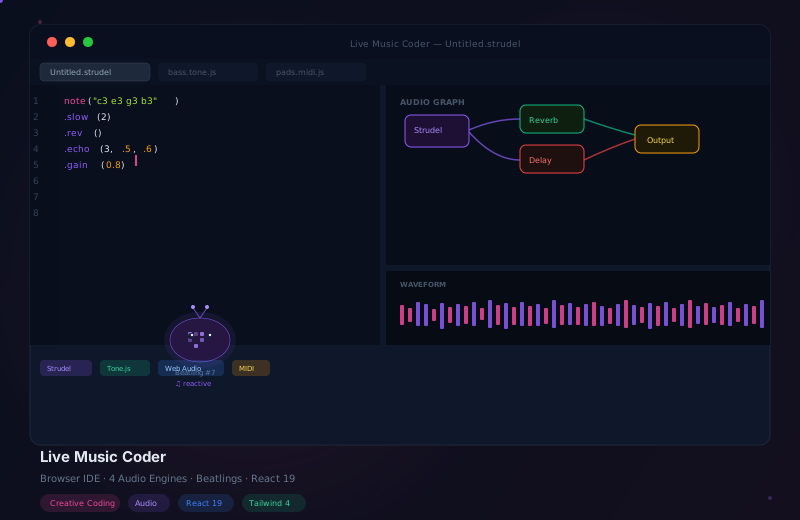
Live Music Coder: Music IDE in the Browser and as Desktop App

How It Started: An Instagram Video
I had never heard of live music coding. Not at all.
Then one evening I was doom-scrolling on Instagram — and suddenly I stopped. A woman was sitting in front of her laptop, writing code live on stage, and telling stories while doing it. Music emerged from her code in real time. The audience listened. I was hooked.
I had no idea what it was. But I immediately wanted to do it myself.
Research led me to strudel.cc — the browser tool she had likely been using. I played with it for a while. The mechanics were impressive, but the interface? No. Too bare, too unstructured — nothing I actually wanted to work with.
So I did what I always do: I built my own.
Project Timeline
Explored the live coding landscape (Strudel, Sonic Pi, TidalCycles). Designed the engine abstraction layer. Evaluated CodeMirror 6 as the editor.
Integrated CodeMirror 6 with a custom extension system. Connected Strudel as the first audio source. 500ms debounce for live evaluation.
Integrated Tone.js, Web Audio API, and MIDI Output as additional engines. Unified Start/Stop/Error API for all four engines.
React Flow as bidirectional audio routing visualizer. Three 60fps Canvas visualizers (Waveform, Spectrum, Pattern Timeline) sharing a single AnalyserNode.
Audio-reactive creatures with dual-brain system (Neural Net + Conway). IndexedDB autosave, URL sharing with lz-string, GitHub Gist integration.
104 tests across 19 files. Full DE/EN/ES translation with i18next. MediaRecorder-based audio recording. Launch at live-music-coder.pro.
The Core Problem: Four Completely Different APIs
The biggest technical challenge was not any single engine — it was unifying four that work completely differently:
Pattern-based language inspired by TidalCycles. Uses mini-notation for rhythms: note("c3 e3 g3").slow(2).
Synthesizers and effects with scheduled playback. Ideal for melodic structures and classic synth sounds.
Raw access to browser audio processing. Maximum control for experimental sounds and effect chains.
Sends MIDI signals to external synthesizers and DAWs via WebMidi.js. Connects digital and analog equipment.
The solution: an engine abstraction layer with a unified Start/Stop/Error API for each engine — but completely different code-parsing logic.
The Editor: CodeMirror 6 with Engine Detection
// Engine-specific syntax highlighting
function buildEditorExtensions(engine: AudioEngine) {
  const base = [darkTheme, lineNumbers(), autocompletion(),
    debounce(500, (code) => executeCode(code, engine))];

  switch (engine) {
    case 'strudel': return [...base, strudelHighlighting, strudelAutoComplete];
    case 'tone':    return [...base, toneJsHighlighting, toneJsSnippets];
    case 'webaudio': return [...base, webAudioHighlighting];
    case 'midi':    return [...base, midiHighlighting, midiChannelLens];
  }
}
The 500ms debounce is critical: too aggressive means constant re-evaluation mid-typing. Too slow means no “live” feel.
The Node Graph: React Flow as Audio Routing Visualizer
The most unusual feature is the node graph — it does not show what the user manually built, but what the code actually produces. The graph updates bidirectionally: change code and the graph updates. Drag a parameter in the graph and the code updates.
60fps Visualizers with Canvas 2D
Seven specialized visualizers — expanded from the original three across multiple development sprints:
Oscilloscope display of the audio signal in real time. AnalyserNode.getTimeDomainData() with requestAnimationFrame.
FFT-based frequency analysis. 512 bins visualized as bars — from 20Hz to 20kHz.
Strudel-specific visualizer showing active pattern slots, loops, and timing events.
DAW-style display with scrolling timeline, velocity colors and note labels. Slider widgets for parameters.
Visual pattern grid — shows active beats as dots in a grid. Ideal for rhythmic overview.
Rotating note spiral — pitches arranged on a circle, ideal for harmonic relationships.
Frequency wheel visualization — shows active frequencies as segments on a rotating wheel.
The performance secret: all three visualizers share a single AnalyserNode — no multiple stream taps, no latency differences.
The Beatlings: Creatures That “Hear” Music
The most playful feature: Beatlings — 6 creature species that react to music. Their dual brain combines a neural network (reacts to frequency features) with Conway’s Game of Life (body pattern evolution). Play loud bass beats and Crasher Beatlings activate. Gentle melodies make Drifters emerge.
Persistence: Three Backends
Auto-save every 30 seconds. Complete session history with cross-session undo/redo.
Current code compressed with lz-string and encoded as a URL parameter. One link shares the exact code state.
Save and load Gists via Octokit. Public snippets can be shared with the community.
Post-Launch: 7 Development Sprints
After the initial 12-week sprint, development continued — with seven feature sprints that transformed the project from a proof-of-concept into a full-featured creative tool:
DAW-style Piano Roll visualizer with scrolling timeline, velocity colors and interactive slider widgets for parameter control.
Visual pattern grid as a new visualizer. Enhanced recording functionality with improved audio quality.
Gamepad API integration for controller input. MIDI input module for external hardware. Solo/mute shortcuts per engine. Console panel for live debugging.
Two new visualizers: rotating note spiral for harmonic relationships and frequency wheel for active frequencies.
Full settings panel with 4 themes, font size adjustment, Vim mode, Zen mode, line numbers and word wrap. All persisted to localStorage.
@strudel/draw integration for visual pattern creation. Inline widgets with real-time feedback directly in the editor.
Native macOS app (Intel + Apple Silicon) with auto-updater, .lmc file format and code signing. Windows and Linux planned.
The Sessions Library: 43 Curated Pieces
One of the biggest additions is the Sessions Library — a collection of 43 AI-composed music pieces that serve as a learning and inspiration resource:
Each session has multiple movements with named keys, BPM markings and composer notes.
Ambient, Blues, Deep Work, Dub, Electronic, Lo-Fi, Narrative, Retro, Techno and Trance.
Dedicated /sessions route with filtering and search. Each session can be opened directly in the editor.
The pieces demonstrate various techniques — from minimal ambient patterns to complex trance structures.
Desktop App: Electron for macOS
Live Music Coder is no longer just a browser tool — since v1.0.2 there is a native Electron desktop app:
- macOS Intel + Apple Silicon (.dmg) — code-signed and notarized
- Auto-updater — new versions are automatically detected and installed
- .lmc file format — custom project format with file association
- Windows + Linux — planned
Extended Input: Gamepad and MIDI
Since Sprint 3, Live Music Coder supports two new input methods:
Controller input via the Gamepad API. Axes and buttons can be mapped to audio parameters.
External MIDI controllers send CC messages directly to the engines. Ideal for knob-based live performance.
Each audio engine can be individually muted or soloed — perfect for isolating during editing.
Real-time error logging and debugging directly in the IDE. No switching to browser DevTools needed.
Quality: Tests and Stability
Tested: engine executor logic, code parsing per engine, graph derivation from AST, creature spawn algorithms, and persistence layers.
The Surprise at the End: The License
I made a mistake I would like to spare others from: I did not read the license before I started building.
When the project was finished, I finally read Strudel’s license. What I found was the GNU Affero General Public License (AGPL-3.0) — a copyleft license that requires any software product that builds on Strudel to also be released under the AGPL-3.0.
After some reflection, I decided to do the right thing: Live Music Coder will be released under the AGPL-3.0. Strudel is a remarkable open-source project, and the community that built it deserves that reciprocity.
Frequently Asked Questions
Frequently Asked Questions
Strudel is the best starting point. The mini-notation is intuitive and produces audible results quickly. note("c3 e3 g3").slow(2) is enough for your first beat. Tone.js is the next step for more melodic structures.
No. Live music coding is code-based, not notation-based. Basic understanding of rhythm helps, but most patterns emerge through experimentation. The pattern language is closer to programming than to classical music theory.
Each engine has strengths: Strudel for rhythmic patterns, Tone.js for synthesizers, Web Audio for experimental sounds, MIDI for external equipment. The combination enables workflows that would not be possible with a single engine.
The code is parsed into an AST (Abstract Syntax Tree). Each audio node in the AST gets a stable ID. The graph reads the AST and displays the nodes. Changes in the graph modify the AST, which is serialized back to code. The stable IDs prevent nodes from jumping with every change.
Yes — with the Electron desktop app everything works fully offline. The browser version needs an internet connection for GitHub Gist and URL sharing, but editor and audio engines also work offline there thanks to IndexedDB.
The Beatlings — audio-reactive creatures with a dual-brain system — are proprietary code and were removed from the open-source version. They are being developed further as a separate, standalone project.
The project is live at live-music-coder.pro and available as an open-source project on GitHub. The macOS desktop app is available for download. Pull requests welcome.