JSON-LD Structured Data in Astro

You have built a well-structured Astro website. The content is thoughtful, pages load fast, the design meets accessibility standards. But when Google crawls your pages, it only sees text and HTML elements. It does not automatically understand that your FAQ section contains questions and answers, that your services page describes offerings, or that your business operates in a specific location. This is exactly where structured data comes in.
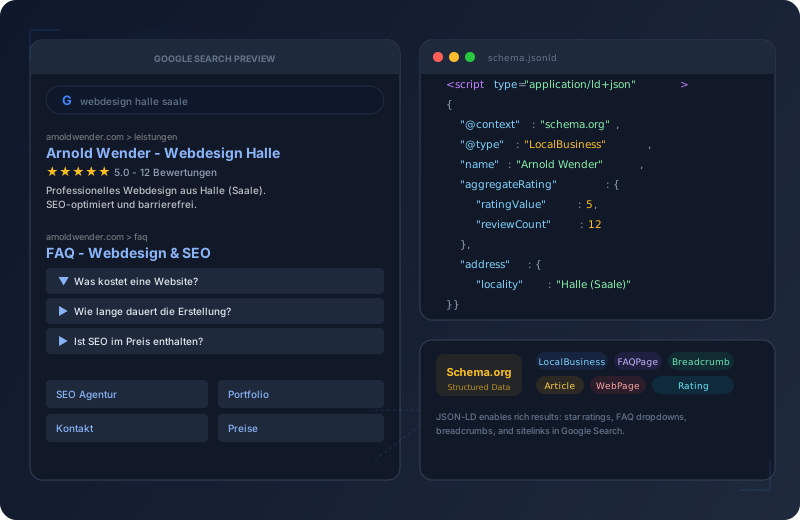
JSON-LD (JavaScript Object Notation for Linked Data) is Google’s preferred format for telling machines what the content of a page means — not just what it displays. An invisible <script> tag in the HTML head delivers a structured dataset to search engines that directly leads to Rich Results in search: expandable FAQ answers, star ratings, breadcrumb trails, and business cards with address and opening hours.
Google uses structured data to understand the content of a page and to display that content in a visually more appealing format in search results — known as Rich Results.
Why Structured Data Matters
Rich Results make your page visually stand out from the mass of search results. While regular results only show title, URL, and meta description, pages with structured data can display expandable FAQ sections, star ratings, breadcrumb navigation, price tables, and business details directly in the SERP. That means more screen real estate, more attention, and significantly higher click-through rates.
Structured data is not a ranking factor in the strict sense — but it helps Google better understand the context of your content. And indirectly, higher click-through rates, lower bounce rates, and better user engagement do improve your ranking.
What Is JSON-LD?
JSON-LD stands for JavaScript Object Notation for Linked Data. It is a standardized format that embeds semantic information inside a <script> tag in the HTML document. Search engines read this tag; users never see it.
<!-- Invisible to users, machine-readable for Google -->
<script type="application/ld+json">
{
  "@context": "https://schema.org",
  "@type": "WebPage",
  "name": "My Page",
  "description": "A description of the page"
}
</script>
The crucial point: JSON-LD is not rendered. It sits as an invisible script in the <head> or at the end of the <body>. It neither blocks rendering nor slows down page load. It is pure metadata markup — Google reads it, the browser ignores it.
The Four Schema Types at a Glance
This portfolio implements four Schema.org types that together create a complete semantic picture of the website for search engines.
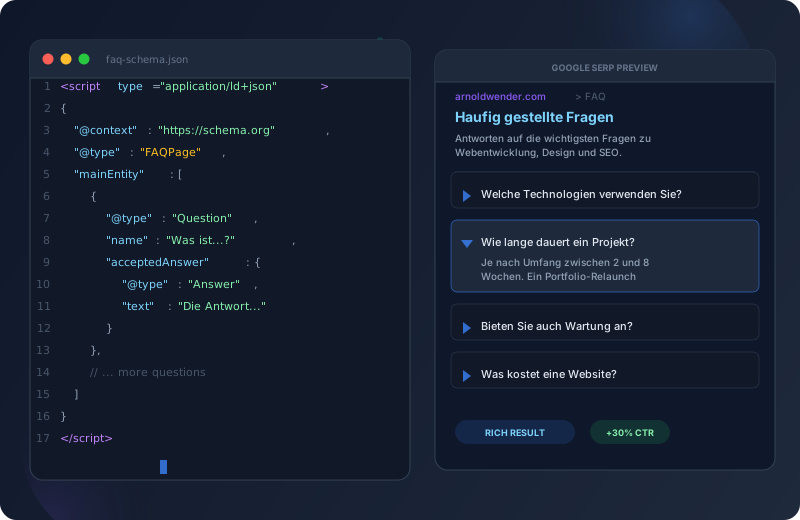
Captures question-answer pairs semantically so search engines and AI systems (Google AI Overviews, ChatGPT, Perplexity) can surface your answers. Note: as of August 2023, Google only shows FAQ rich results for authoritative government and health sites — general websites still benefit from the semantic clarity for AI grounding and Knowledge Graph, but no longer earn the expandable SERP treatment.
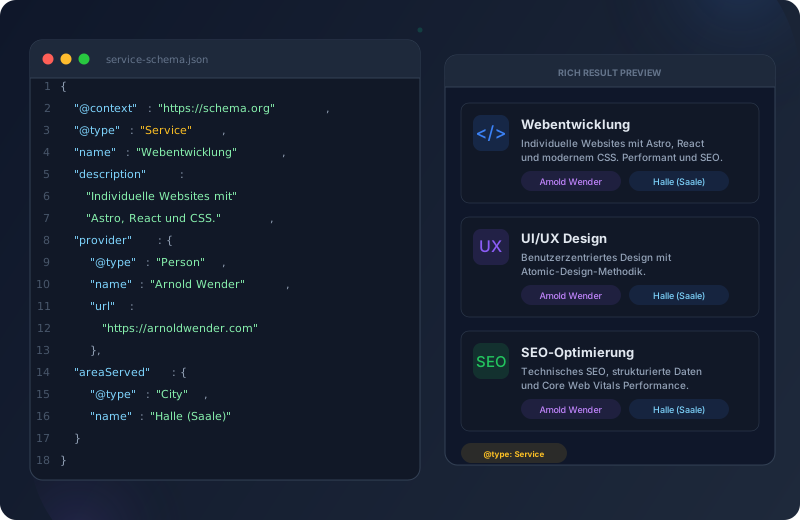
Tells Google what services you offer, including name, description, and provider information. Especially relevant for freelancers and agencies whose service pages can be displayed with additional details in search results. Combined with LocalBusiness, it creates a comprehensive picture of your offerings.
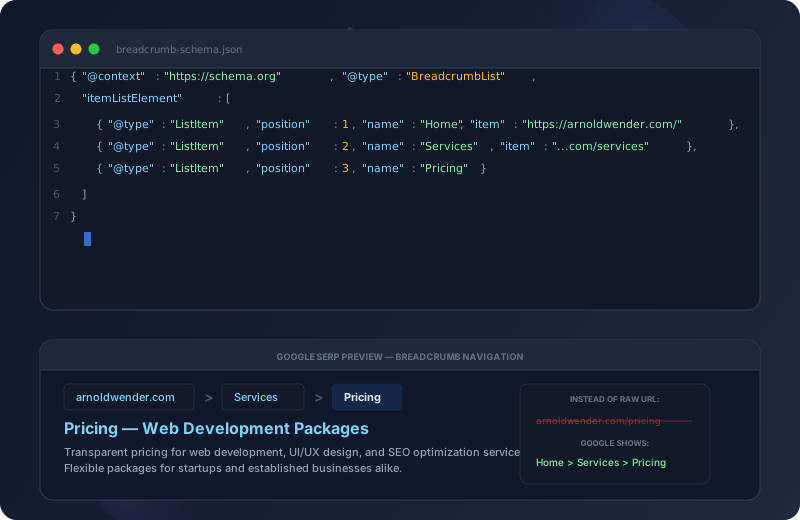
Creates a navigation path in search results (Home > Services > Web Development). Google replaces the raw URL with a readable path structure. This improves orientation for users directly in the SERP and signals a clear website hierarchy to Google. Generated on every page via the Breadcrumbs component.
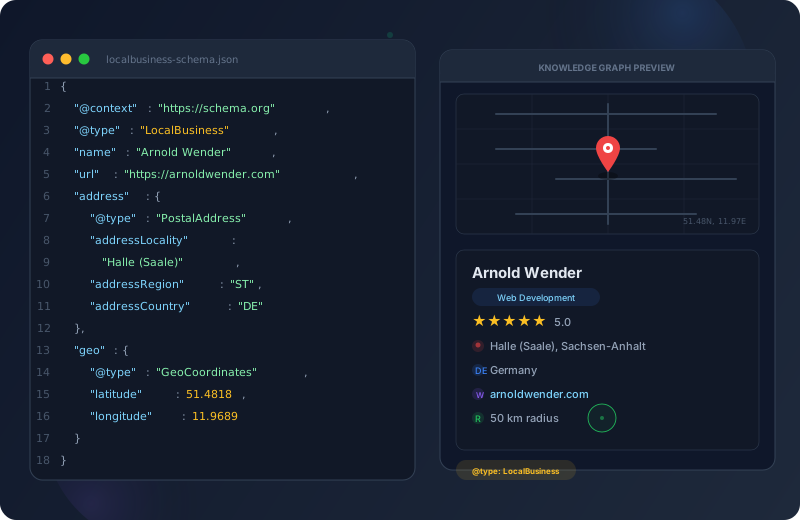
Contains business name, address, geo-coordinates, and contact details. Essential for local SEO -- Google uses this data for the Knowledge Graph, Google Maps embeds, and local search. Output site-wide via the SEO component, pulling data directly from the central SITE configuration.
FAQPage Schema Implementation
The FAQPage schema captures question-answer pairs semantically. The Astro implementation leverages the existing FAQ data structure and generates JSON-LD automatically.
---
/* FAQPage JSON-LD generation from the FAQ data array */
interface FaqItem {
  question: string;
  answer: string;
}

interface Props {
  items: FaqItem[];
}

const { items } = Astro.props;

/* Schema.org FAQPage structured data */
const faqSchema = {
  "@context": "https://schema.org",
  "@type": "FAQPage",
  "mainEntity": items.map((item) => ({
    "@type": "Question",
    "name": item.question,
    "acceptedAnswer": {
      "@type": "Answer",
      "text": item.answer,
    },
  })),
};
---

<!-- Visible accordion for users -->
<section id="faq" class="faq">
  {items.map((item) => (
    <details class="faq__item">
      <summary class="faq__question">{item.question}</summary>
      <p class="faq__answer">{item.answer}</p>
    </details>
  ))}
</section>

<!-- Invisible JSON-LD for search engines -->
<script
  type="application/ld+json"
  set:html={JSON.stringify(faqSchema)}
/>
{
"@context": "https://schema.org",
"@type": "FAQPage",
"mainEntity": [
{
"@type": "Question",
"name": "What technologies do you use?",
"acceptedAnswer": {
"@type": "Answer",
"text": "We work with Astro, React, TypeScript, and modern CSS techniques. All projects follow the Atomic Design methodology."
}
},
{
"@type": "Question",
"name": "How long does a typical project take?",
"acceptedAnswer": {
"@type": "Answer",
"text": "Depending on scope, between 2 and 8 weeks. A portfolio relaunch typically takes 3-4 weeks."
}
},
{
"@type": "Question",
"name": "Do you offer maintenance?",
"acceptedAnswer": {
"@type": "Answer",
"text": "Yes, we offer ongoing maintenance, security updates, and performance monitoring as a monthly service."
}
}
]
}Google Search Results with FAQPage Rich Result:
+---------------------------------------------------+
| Arnold Wender — Web Developer & Creator |
| https://arnoldwender.com |
| Modern web design with Astro, React and... |
| |
| > What technologies do you use? |
| > How long does a typical project take? |
| > Do you offer maintenance? |
+---------------------------------------------------+
This expandable treatment is what FAQPage schema
looked like historically. Since August 2023 it is
reserved for government and health sites. General
sites keep the schema for AI/LLM grounding, but
not for the SERP dropdown.Service Schema for the Services Page
The Service schema communicates to Google what services you offer. Each service is captured individually with name, description, and provider reference.
---
/* Service schema for the services page */
import { SITE } from '../../lib/constants';

const services = [
  {
    name: 'Web Development',
    description: 'Custom websites with Astro, React, and modern CSS.',
  },
  {
    name: 'UI/UX Design',
    description: 'User-centered design with Atomic Design methodology.',
  },
  {
    name: 'SEO Optimization',
    description: 'Technical SEO, structured data, and performance tuning.',
  },
];

/* Each service becomes its own schema object */
const serviceSchemas = services.map((service) => ({
  "@context": "https://schema.org",
  "@type": "Service",
  "name": service.name,
  "description": service.description,
  "provider": {
    "@type": "Person",
    "name": SITE.author,
    "url": SITE.url,
  },
}));
---

{serviceSchemas.map((schema) => (
  <script
    type="application/ld+json"
    set:html={JSON.stringify(schema)}
  />
))}
[
{
"@context": "https://schema.org",
"@type": "Service",
"name": "Web Development",
"description": "Custom websites with Astro, React, and modern CSS. Performant, accessible, and SEO-optimized.",
"provider": {
"@type": "Person",
"name": "Arnold Wender",
"url": "https://arnoldwender.com"
}
},
{
"@context": "https://schema.org",
"@type": "Service",
"name": "UI/UX Design",
"description": "User-centered design with Atomic Design methodology. Wireframes, prototypes, and design systems.",
"provider": {
"@type": "Person",
"name": "Arnold Wender",
"url": "https://arnoldwender.com"
}
},
{
"@context": "https://schema.org",
"@type": "Service",
"name": "SEO Optimization",
"description": "Technical SEO, structured data, and Core Web Vitals performance optimization.",
"provider": {
"@type": "Person",
"name": "Arnold Wender",
"url": "https://arnoldwender.com"
}
}
]BreadcrumbList in Astro
The BreadcrumbList is the schema that gets generated on every single page. It describes the navigation path from the homepage to the current page. In Astro, this information flows through an elegant prop chain from the page through the layout to the Breadcrumbs component.
Breadcrumb Data Flow
- Define Breadcrumbs in the Page
Each Astro page defines its breadcrumbs as an array of objects with label and an optional href. The last item has no link -- it represents the current page.
- Pass to BaseLayout
The page passes the breadcrumbs array as a prop to BaseLayout. BlogLayout and PortfolioLayout automatically forward this prop to BaseLayout.
- Breadcrumbs Component Renders HTML and JSON-LD
The Breadcrumbs molecule component renders both the visible navigation as an HTML list and the invisible BreadcrumbList schema as a JSON-LD script.
- Google Shows the Path in the SERP
Instead of the raw URL (arnoldwender.com/blog/json-ld), Google displays the readable path: Home > Blog > JSON-LD Structured Data. This improves click-through rates and user orientation.
---
/* src/pages/services.astro — Breadcrumbs for the services page */
import BaseLayout from '../layouts/BaseLayout.astro';

const breadcrumbs = [
  { label: 'Home', href: '/' },
  { label: 'Services' },  /* No href = current page */
];
---

<BaseLayout
  seo={{ title: 'Services', description: '...' }}
  breadcrumbs={breadcrumbs}
>
  <section id="services">
    <!-- Page content -->
  </section>
</BaseLayout>
---
/* src/components/molecules/Breadcrumbs.astro */
import type { BreadcrumbItem } from '../../types';
interface Props {
items: BreadcrumbItem[];
}
const { items } = Astro.props;
/* Generate BreadcrumbList schema */
const breadcrumbSchema = {
"@context": "https://schema.org",
"@type": "BreadcrumbList",
"itemListElement": items.map((item, index) => ({
"@type": "ListItem",
"position": index + 1,
"name": item.label,
...(item.href && { "item": `${Astro.site}${item.href}` }),
})),
};
---
<!-- Visible breadcrumb navigation -->
<nav aria-label="Breadcrumb" class="breadcrumbs">
<ol class="breadcrumbs__list">
{items.map((item, i) => (
<li class="breadcrumbs__item">
{item.href
? <a href={item.href}>{item.label}</a>
: <span aria-current="page">{item.label}</span>
}
</li>
))}
</ol>
</nav>
<!-- Structured data for Google -->
<script
type="application/ld+json"
set:html={JSON.stringify(breadcrumbSchema)}
/>{
"@context": "https://schema.org",
"@type": "BreadcrumbList",
"itemListElement": [
{
"@type": "ListItem",
"position": 1,
"name": "Home",
"item": "https://arnoldwender.com/"
},
{
"@type": "ListItem",
"position": 2,
"name": "Blog",
"item": "https://arnoldwender.com/blog"
},
{
"@type": "ListItem",
"position": 3,
"name": "JSON-LD Structured Data"
}
]
}LocalBusiness for Geo-Targeting
The LocalBusiness schema is essential for any business serving customers in a specific region. It contains the company name, address, geo-coordinates, and contact details. Google uses this information for the Knowledge Graph, local search results, and Google Maps embeds.
In this portfolio, geo data is maintained centrally in the SITE configuration and automatically transferred into the LocalBusiness schema.
/* src/lib/constants.ts — Central configuration */
export const SITE: SiteConfig = {
  name: 'Arnold Wender',
  description: 'Web Developer & Digital Creator',
  url: 'https://arnoldwender.com',
  locale: 'en',
  author: 'Arnold Wender',
  geo: {
    latitude: 51.4818,
    longitude: 11.9689,
    placeName: 'Halle (Saale), Germany',
    region: 'ST',
  },
};
{
"@context": "https://schema.org",
"@type": "LocalBusiness",
"name": "Arnold Wender — Web Development",
"description": "Web Developer & Digital Creator",
"url": "https://arnoldwender.com",
"telephone": "+49-XXX-XXXXXXX",
"address": {
"@type": "PostalAddress",
"addressLocality": "Halle (Saale)",
"addressRegion": "ST",
"addressCountry": "DE"
},
"geo": {
"@type": "GeoCoordinates",
"latitude": 51.4818,
"longitude": 11.9689
},
"areaServed": {
"@type": "GeoCircle",
"geoMidpoint": {
"@type": "GeoCoordinates",
"latitude": 51.4818,
"longitude": 11.9689
},
"geoRadius": "50000"
}
}---
/* src/components/seo/SEO.astro — Excerpt */
import { SITE } from '../../lib/constants';
/* LocalBusiness only on the homepage */
const isHomepage = Astro.url.pathname === '/';
const localBusinessSchema = isHomepage && SITE.geo ? {
"@context": "https://schema.org",
"@type": "LocalBusiness",
"name": SITE.name,
"description": SITE.description,
"url": SITE.url,
"address": {
"@type": "PostalAddress",
"addressLocality": SITE.geo.placeName,
"addressRegion": SITE.geo.region,
"addressCountry": "DE",
},
"geo": {
"@type": "GeoCoordinates",
"latitude": SITE.geo.latitude,
"longitude": SITE.geo.longitude,
},
} : null;
---
{localBusinessSchema && (
<script
type="application/ld+json"
set:html={JSON.stringify(localBusinessSchema)}
/>
)}Multilingual Structured Data
For multilingual websites, each language version must generate its own structured data. This means: the German page delivers German JSON-LD, the English page delivers English JSON-LD, the Spanish page delivers Spanish JSON-LD. Search engines associate the structured data with the respective language version. If you are building a multilingual Astro site and want to learn how translated URLs and hreflang tags fit into this picture, read my guide on i18n without plugins using slug mapping.
In Astro, multilingual pages are managed through folder structure (/de/, /en/, /es/) or via Content Collections with a locale field. Each language version of the page renders its own <script type="application/ld+json"> with the translated content. The schema structure (@type, @context) remains identical — only the human-readable fields (name, description, text) are translated.
The implementation uses locale information from the frontmatter or URL. FAQ questions, service descriptions, and breadcrumb labels come from language-specific data files. The schema is generated at build time for each language separately — there is no dynamic language switching in JSON-LD.
The most common mistake is mixing languages within a single JSON-LD block. If the page is in English, all text in the schema must also be in English. A second mistake: forgetting to set the inLanguage property. Third mistake: identical structured data across all language versions — Google recognizes this as duplicate content.
Testing and Validation
Implementing structured data is only half the work. Without systematic testing, you cannot be sure that Google correctly interprets your schemas. There are four tools you should use in your workflow.
Validation Workflow
- Google Rich Results Test
The official Google tool at search.google.com/test/rich-results. Enter your URL or paste HTML code. It shows you exactly which Rich Results Google can generate from your structured data -- and reports errors or warnings.
- Schema.org Validator
At validator.schema.org you can validate your JSON-LD against the Schema.org specification. This tool is stricter than Google's test and also checks fields that Google itself ignores. Ideal for full conformance.
- Chrome DevTools Inspection
Open DevTools (F12), go to Elements, and search for <script type="application/ld+json">. Here you see the actual JSON-LD output of your page. Check if the data is correct, all fields are present, and no JavaScript errors interfere with generation.
- Google Search Console
After deployment, monitor structured data status over time in the "Enhancements" > "Rich Results" section. Google shows you which pages are Rich-Result-eligible, which have errors, and how impressions develop.
Avoiding Common Mistakes
Correct implementation of structured data requires precision. Small errors can cause Google to completely ignore your schema. Here are the most common pitfalls and how to avoid them.
| Aspect | Correct Recommended | Wrong |
|---|---|---|
| Schema per page | One FAQPage schema with all questions | Multiple FAQPage schemas on the same page |
| Required fields | All required fields per Schema.org | Omitting fields and hoping Google accepts it |
| @type spelling | @type: "FAQPage" (exact) | @type: "faqpage" or @type: "FAQ" |
| Content matching | JSON-LD text = visible page content | Different text in schema than on the page |
| Nesting | Flat structure, clean @type assignments | Over-deep nesting without clear hierarchy |
| Multiple schemas | Separate <script> tags for each type | All schemas packed into a single <script> tag |
| Language | inLanguage matching the page language | No inLanguage or wrong language specified |
Sitemap Integration
Structured data and the sitemap work hand in hand. Pages with rich schema markup deserve higher crawl priority because they potentially deliver more information for Google’s index. In the Astro configuration, this is implemented through a tiered priority system.
The homepage contains Organization and LocalBusiness schemas. Highest crawl priority with daily crawl frequency.
Services, About, Contact -- pages with Service and ContactPage schemas. Weekly crawl frequency.
Each article has an Article schema with author, date, and tags. Monthly crawl frequency for older posts.
Project pages with CreativeWork schema. Updated less frequently but important for overall site structure.
Tag and category pages with CollectionPage schema. Help Google understand the taxonomy.
Search pages and pagination. Low priority but needed for complete indexation.
Frequently Asked Questions
Frequently Asked Questions
No, JSON-LD has virtually no impact on performance. The script tags are typically only a few kilobytes in size and are not rendered or executed by the browser. They block neither parsing nor page rendering. Unlike Microdata, which is embedded in HTML, JSON-LD is completely separated from the visual DOM.
There is no technical limit. Google recommends using all relevant schema types as long as they describe the actual page content. A typical page might combine WebPage, BreadcrumbList, and a content-specific schema (FAQPage, Service, Article). The important thing is that each schema type goes in its own <script> tag.
Technically yes, but Google explicitly recommends JSON-LD as the preferred format. Microdata is embedded directly in HTML attributes, which makes code harder to maintain and can cause issues in component-based frameworks like Astro or React. JSON-LD completely separates structured data from markup -- cleaner, easier to debug, and easier to update.
Between a few days and several weeks. After Google crawls your page with the new structured data, the schema needs to be validated and Rich Results generated. You can speed up the process by submitting the URL for re-indexing via Google Search Console. Monitor progress in the Rich Results report of the Search Console.
Google silently ignores faulty schemas -- there is no penalty. However, no Rich Results will be generated. Use the Google Rich Results Test to catch errors before deployment. Common mistakes: missing required fields, incorrect @type values, and content in the schema that does not match the visible page content.
If your JSON-LD is dynamically generated from page data (as in this Astro setup), it updates automatically with every build. When FAQ questions, services, or breadcrumbs change, the structured data reflects this automatically. With static JSON-LD blocks, you must manually ensure consistency.
Conclusion
Structured data with JSON-LD is not an optional SEO bonus — it is a fundamental part of modern web development. It costs no performance, requires no framework change, and can be elegantly integrated into Astro’s existing component architecture. For a complete guide on optimizing your Core Web Vitals alongside structured data, see Building for Performance. Four schema types — FAQPage, Service, BreadcrumbList, and LocalBusiness — cover the most important use cases for a portfolio or business website.
The key lies in automation: structured data should not be maintained manually but instead feed from the same data sources as the visible content. In Astro, this means: props and Content Collections flow into components that render both the visual HTML and the invisible JSON-LD. A single source of truth for humans and machines alike.