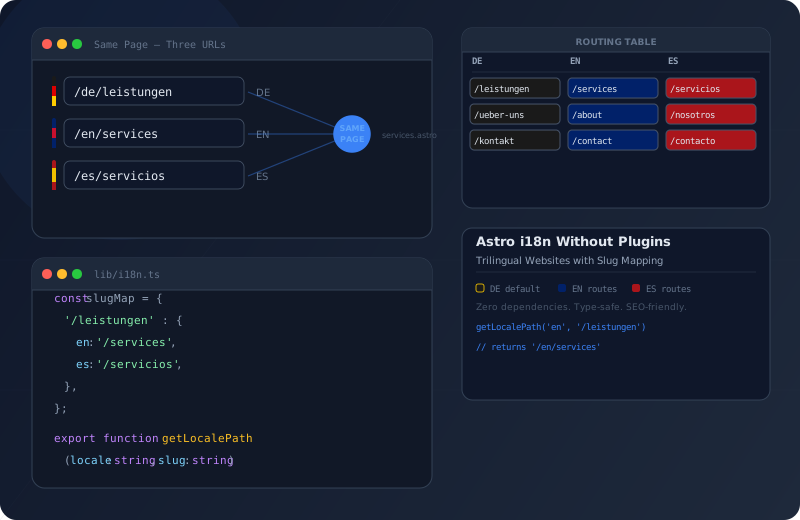
Astro i18n Without Plugins: Slug Mapping Guide

When you need a multilingual website, the instinct is to reach for a plugin. Astro-i18next, Paraglide, astro-i18n-aut — options abound. But every plugin introduces dependencies, imposes folder structures, and does things you may not need. What if you want full control? What if you need translated URLs — /über-mich in German, /about in English, /sobre-mi in Spanish — with nothing opaque in between?
That is exactly what I built for this website: trilingual, using Astro’s built-in i18n routing and a single slug table. No plugin, no magic, fully transparent. In this tutorial, I walk you through every piece step by step.
Astro provides built-in i18n routing support that lets you serve content in multiple languages — with full control over URL patterns and fallback logic.
The Problem with i18n Plugins
Internationalization plugins solve a real problem, but they often come with assumptions that do not fit every project. Some auto-generate folders, others require specific file naming conventions. Most do not translate URLs — you end up with /en/über-mich instead of /en/about. And when you need to debug an issue, you are staring at abstracted code you did not write.
Astro’s built-in i18n routing provides the foundation: locale-based prefixes, default locale detection, and language negotiation. What it does not provide is slug translation — and that is precisely where our custom solution comes in.
Architecture Overview
The concept is straightforward: German is the default locale and gets no URL prefix. English gets /en/, Spanish gets /es/. Every page has a semantically meaningful slug in each language — no id parameters, no UUID paths, no language prefixes in front of German slugs.
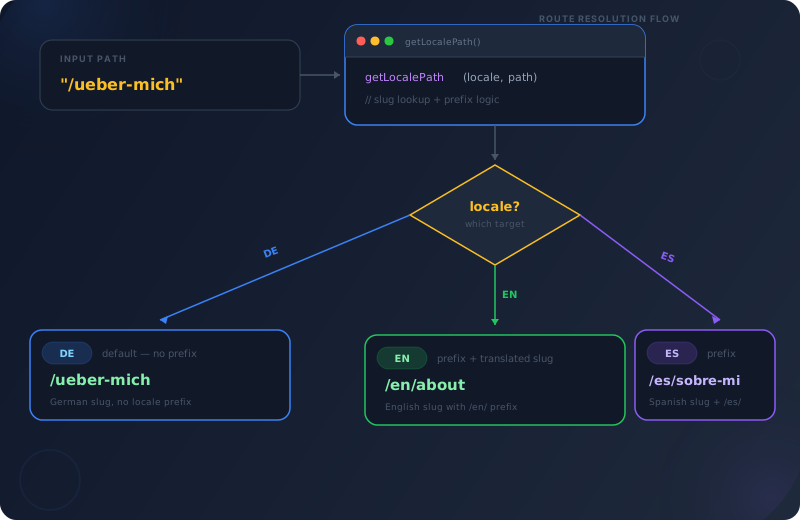
In astro.config.mjs you define the three locales and set prefixDefaultLocale to false. This means German has no prefix — /kontakt instead of /de/kontakt. English and Spanish automatically get /en/ and /es/ as prefixes. That is the only configuration Astro itself requires.

A central TypeScript file (src/i18n/utils.ts) contains a table mapping every page path to its three language variants. /kontakt becomes /contact (EN) and /contacto (ES). A reverse lookup map enables resolution in both directions — from any slug to any target slug.
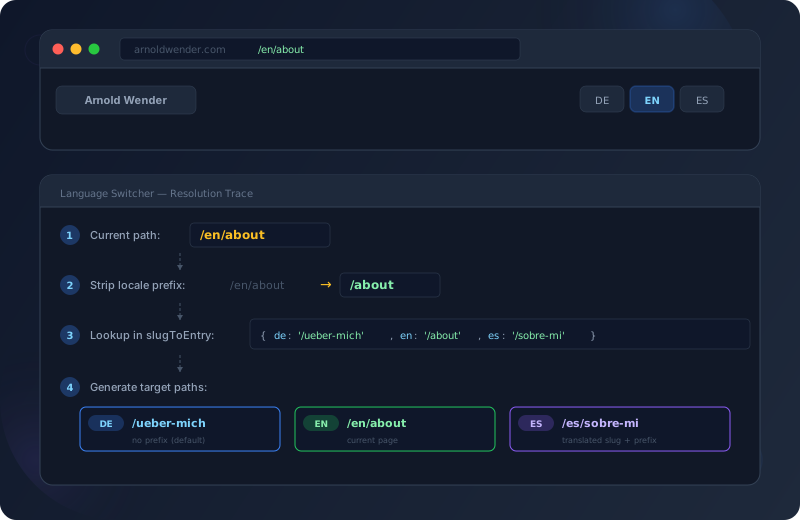
Two core functions use the table: getLocalePath() generates locale-aware paths for navigation and links. getLocalePathFromCurrent() takes the current URL and generates the equivalent path in another language — perfect for the language switcher.
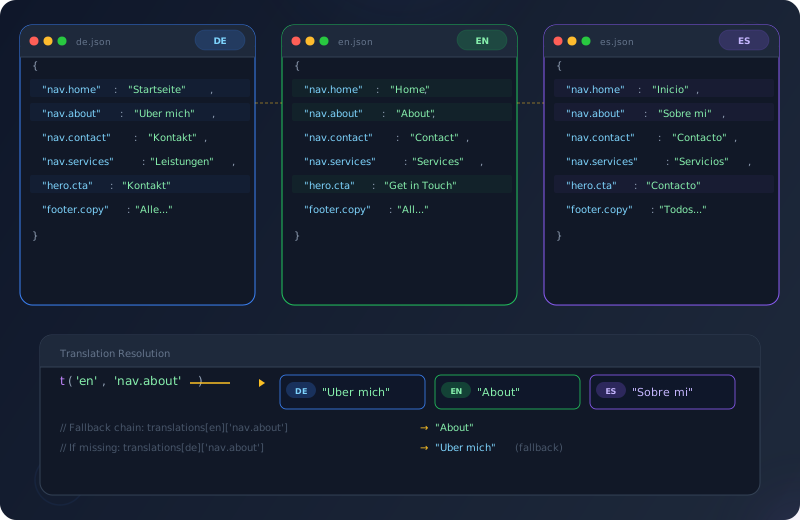
Three JSON files (de.json, en.json, es.json) contain all UI text as flat key-value pairs. The function t(locale, key) returns the translated string, with automatic fallback to German. Simple, type-safe, and with zero runtime overhead.
The i18n Configuration in Astro
The starting point is astro.config.mjs. This is where you tell Astro which languages your site supports and how routing works.
// astro.config.mjs
import { defineConfig } from 'astro/config';

export default defineConfig({
  site: 'https://arnoldwender.com',
  output: 'static',

  // i18n — DE (default, no prefix), EN and ES prefixed
  i18n: {
    defaultLocale: 'de',
    locales: ['de', 'en', 'es'],
    routing: {
      prefixDefaultLocale: false,
    },
  },
});With these three lines of configuration, Astro understands that:
- Pages in
src/pages/belong to the German version (no prefix) - Pages in
src/pages/en/are the English version (prefix/en/) - Pages in
src/pages/es/are the Spanish version (prefix/es/) Astro.currentLocaleautomatically provides the current language in every page
What Astro does not do: it does not translate slugs. /en/kontakt is a valid English route as far as Astro is concerned — but semantically nonsensical. This is where our custom work begins.
The Slug Table
The heart of the solution is a simple table mapping every path to its language variants. It lives in src/i18n/utils.ts and intentionally has zero dependencies.
// src/i18n/utils.ts — Trilingual slug mapping

const slugTable: { de: string; en: string; es: string }[] = [
  { de: '/kontakt',          en: '/contact',        es: '/contacto' },
  { de: '/über-mich',       en: '/about',          es: '/sobre-mi' },
  { de: '/preise',           en: '/pricing',        es: '/precios' },
  { de: '/datenschutz',      en: '/privacy',        es: '/privacidad' },
  { de: '/barrierefreiheit', en: '/accessibility',  es: '/accesibilidad' },
  { de: '/impressum',        en: '/impressum',      es: '/aviso-legal' },
  { de: '/blog',             en: '/blog',           es: '/blog' },
  { de: '/leistungen',       en: '/services',       es: '/servicios' },
  { de: '/faq',              en: '/faq',            es: '/faq' },
  { de: '/links',            en: '/links',          es: '/enlaces' },
  { de: '/stack',            en: '/stack',           es: '/stack' },
  { de: '/sitemap',          en: '/sitemap',        es: '/mapa-del-sitio' },
];
// Reverse lookup — any locale's slug → full entry for cross-locale resolution
const slugToEntry = new Map<string, { de: string; en: string; es: string }>();
for (const entry of slugTable) {
slugToEntry.set(entry.de, entry);
slugToEntry.set(entry.en, entry);
slugToEntry.set(entry.es, entry);
}
// Example: slugToEntry.get('/contact')
// → { de: '/kontakt', en: '/contact', es: '/contacto' }
//
// slugToEntry.get('/contacto')
// → { de: '/kontakt', en: '/contact', es: '/contacto' }The table is deliberately flat. Each entry is an object with three strings — no nested structures, no IDs, no metadata. This makes it easy to read, easy to extend, and easy to debug.
The slugToEntry map is the key trick: it registers every slug from every language as a key and points to the same entry. This way you can look up any slug — /contact (EN), /contacto (ES), or /kontakt (DE) — and find the entry to resolve the slug of any other language. Resolution works in every direction.
The getLocalePath() Helper
The first core function generates locale-aware paths. It is used in navigation, internal links, and anywhere you need a path for a specific language.
/**
 * Generate a locale-prefixed path with slug translation.
 * DE (default) gets no prefix and uses German slugs.
 * EN/ES get prefixed with locale code and use localized slugs.
 * Accepts slugs from ANY locale as input — resolves to target locale.
 */
export function getLocalePath(locale: string | undefined, path: string): string {
  const lang = (locale || 'de') as Locale;
  const entry = slugToEntry.get(path);

  if (lang === 'de') {
    // DE (default) — no prefix, return German slug
    return entry ? entry.de : path;
  }

  // EN/ES — prefix with locale code, use locale-specific slug
  const targetSlug = entry ? entry[lang] : path;
  return `/${lang}${targetSlug}`;
}
---
// In any Astro component
import { getLocalePath } from '../i18n/utils';
const locale = Astro.currentLocale || 'de';
---
<!-- Navigation with translated slugs -->
<nav>
<a href={getLocalePath(locale, '/kontakt')}>
{t(locale, 'nav.contact')}
</a>
<a href={getLocalePath(locale, '/über-mich')}>
{t(locale, 'nav.about')}
</a>
<a href={getLocalePath(locale, '/leistungen')}>
{t(locale, 'nav.services')}
</a>
</nav>
<!-- Results by locale:
DE: /kontakt, /über-mich, /leistungen
EN: /en/contact, /en/about, /en/services
ES: /es/contacto, /es/sobre-mi, /es/servicios
-->The crucial point: you can pass the input path in any language. Whether you pass /kontakt, /contact, or /contacto — the function finds the entry and returns the correct slug for the target language. This makes navigation components language-agnostic: you write them once with German slugs, and the function translates automatically.
The Language Switcher
The language switcher is the piece that ties everything together. It needs to take the current URL, figure out which page the user is currently viewing, and generate the corresponding path in the target language.
/**
 * Normalize a pathname by stripping trailing slashes (except root /).
 * Ensures consistent slug lookup regardless of dev server behavior.
 */
function normalizePath(pathname: string): string {
  return pathname === '/' ? '/' : pathname.replace(/\/+$/, '');
}

/**
 * Translate a full pathname to the equivalent path in the target language.
 * Used by LanguageSwitcher to build correct cross-locale links.
 */
export function getLocalePathFromCurrent(
  targetLocale: string,
  currentPathname: string
): string {
  // Strip locale prefix and trailing slashes → clean base path
  const stripped = currentPathname.replace(/^\/(en|es)(\/|$)/, '/') || '/';
  const basePath = normalizePath(stripped);

  const entry = slugToEntry.get(basePath);
  const lang = targetLocale as Locale;

  if (lang === 'de') {
    // DE (default) — no prefix, return German slug
    return entry ? entry.de : basePath;
  }

  // EN/ES — prefix with locale code, use locale-specific slug
  const targetSlug = entry ? entry[lang] : basePath;
  return `/${lang}${targetSlug === '/' ? '' : targetSlug}` || `/${lang}`;
}
---
// LanguageSwitcher.astro (simplified)
import Icon from '../atoms/Icon.astro';
import { getLocalePathFromCurrent } from '../../i18n/utils';
const currentLocale = Astro.currentLocale || 'de';
const pathname = Astro.url.pathname;
const locales = [
{ code: 'de', label: 'Deutsch', flag: 'DE' },
{ code: 'en', label: 'English', flag: 'EN' },
{ code: 'es', label: 'Español', flag: 'ES' },
];
function getLocalizedPath(locale: string): string {
return getLocalePathFromCurrent(locale, pathname);
}
---
<div class="lang-switcher">
<button aria-expanded="false" aria-haspopup="listbox">
<Icon name="globe" size={16} />
<span>{currentLocale.toUpperCase()}</span>
</button>
<ul role="listbox" aria-label="Select language">
{locales.map((locale) => (
<li role="option" aria-selected={locale.code === currentLocale}>
<a href={getLocalizedPath(locale.code)} hreflang={locale.code}>
<span>{locale.flag}</span>
<span>{locale.label}</span>
</a>
</li>
))}
</ul>
</div>The getLocalePathFromCurrent() function operates in three steps:
-
Strip the prefix: The regex
/^\/(en|es)(\/|$)/removes/en/or/es/from the start of the URL. What remains is the raw slug — regardless of which language it currently represents. -
Look up the slug: The cleaned path is searched in the
slugToEntrymap. If/contactremains, the map finds the entry with all three language versions. -
Assemble the target path: For German there is no prefix, for EN/ES the locale code is prepended.
The Translation JSON Files
Besides slugs, we also need translated UI text: navigation labels, button text, form labels, footer links. These live in three JSON files with identical keys.
{
  "nav.home": "Startseite",
  "nav.about": "Über mich",
  "nav.contact": "Kontakt",
  "nav.services": "Leistungen",
  "nav.blog": "Blog",
  "nav.faq": "FAQ",
  "hero.cta.primary": "Kontakt aufnehmen",
  "hero.cta.secondary": "Portfolio ansehen",
  "footer.copyright": "Alle Rechte vorbehalten.",
  "cookie.message": "Nur essenzielle Cookies — kein Tracking.",
  "cookie.accept": "Akzeptieren"
}
{
"nav.home": "Home",
"nav.about": "About",
"nav.contact": "Contact",
"nav.services": "Services",
"nav.blog": "Blog",
"nav.faq": "FAQ",
"hero.cta.primary": "Get in Touch",
"hero.cta.secondary": "View Portfolio",
"footer.copyright": "All rights reserved.",
"cookie.message": "Only essential cookies — no tracking.",
"cookie.accept": "Accept"
}{
"nav.home": "Inicio",
"nav.about": "Sobre mí",
"nav.contact": "Contacto",
"nav.services": "Servicios",
"nav.blog": "Blog",
"nav.faq": "FAQ",
"hero.cta.primary": "Contacto",
"hero.cta.secondary": "Ver Portfolio",
"footer.copyright": "Todos los derechos reservados.",
"cookie.message": "Solo cookies esenciales — sin rastreo.",
"cookie.accept": "Aceptar"
}The t() helper is deliberately minimal:
import en from './locales/en.json';
import de from './locales/de.json';
import es from './locales/es.json';

type Locale = 'de' | 'en' | 'es';

const translations: Record<Locale, Record<string, string>> = { de, en, es };

/**
 * Get a translated string by key for the given locale.
 * Falls back to German (default) if the key is not found in the target locale.
 */
export function t(locale: string | undefined, key: string): string {
  const lang = (locale || 'de') as Locale;
  return translations[lang]?.[key] || translations.de[key] || key;
}
No nesting, no namespaces, no interpolation. A flat key-value object per language and a function that returns the value. The fallback to German ensures that missing translations never yield an empty string — you always see at least the German text, and if that is missing too, the key itself. Invaluable for debugging.
The File Structure
Here is an overview of how all the pieces fit together:
Architecture Overview
- astro.config.mjs
Defines defaultLocale: "de", locales: ["de", "en", "es"], and prefixDefaultLocale: false. This is the entire framework configuration — three lines that tell Astro how routes map to languages.
- src/i18n/utils.ts
Contains the slug table, the reverse lookup map, getLocalePath(), getLocalePathFromCurrent(), t(), and getTranslations(). A single file of ~110 lines that powers the entire i18n system.
- src/i18n/locales/*.json
Three JSON files (de.json, en.json, es.json) with identical keys and language-specific values. They contain all UI text: navigation, buttons, forms, error messages, SEO metadata.
- src/pages/en/*.astro & src/pages/es/*.astro
For every page there is an English and Spanish version under the respective locale folder. File names match the translated slugs: pages/en/about.astro becomes /en/about, pages/es/sobre-mi.astro becomes /es/sobre-mi.
- Components & Layouts
Header, footer, and navigation use getLocalePath() and t() with Astro.currentLocale to render links and labels language-dependently. No duplication — one component for all three languages.
src/
├── i18n/
│   ├── utils.ts              ← Slug table + helper functions
│   └── locales/
│       ├── de.json            ← German UI text
│       ├── en.json            ← English UI text
│       └── es.json            ← Spanish UI text
├── pages/
│   ├── index.astro            ← DE Homepage (/)
│   ├── kontakt.astro          ← DE Contact (/kontakt)
│   ├── über-mich.astro       ← DE About (/über-mich)
│   ├── leistungen.astro       ← DE Services (/leistungen)
│   ├── en/
│   │   ├── index.astro        ← EN Homepage (/en/)
│   │   ├── contact.astro      ← EN Contact (/en/contact)
│   │   ├── about.astro        ← EN About (/en/about)
│   │   └── services.astro     ← EN Services (/en/services)
│   └── es/
│       ├── index.astro        ← ES Homepage (/es/)
│       ├── contacto.astro     ← ES Contact (/es/contacto)
│       ├── sobre-mi.astro     ← ES About (/es/sobre-mi)
│       └── servicios.astro    ← ES Services (/es/servicios)
├── components/
│   └── molecules/
│       └── LanguageSwitcher.astro  ← Uses getLocalePathFromCurrent()
└── layouts/
    └── BaseLayout.astro       ← Uses t() and getLocalePath()
Plugin-Based vs. Custom Solution
| Aspect | Plugin-Based | Custom Slug Table Recommended |
|---|---|---|
| Bundle size | Additional JS dependency | Zero runtime overhead |
| URL control | Plugin decides path format | Full control over every slug |
| Flexibility | Bound to plugin API | Infinitely extensible |
| Setup effort | npm install + configuration | One file with ~110 lines |
| Slug translation | Often unsupported | Core feature |
| Debugging | Understand plugin internals | Your own code, full transparency |
| Updates | Dependent on plugin maintainers | No external dependencies |
| TypeScript | Varies by plugin | Native TypeScript integration |
SEO Aspects: hreflang and Canonical
Translated URLs are only half the story. Search engines need to know which pages belong together. That is what hreflang tags in the <head> are for. For a deeper look at how structured data like BreadcrumbList and LocalBusiness schemas further enhance multilingual SEO, see my guide on JSON-LD structured data in Astro.
<!-- On the German page /kontakt -->
<link rel="alternate" hreflang="de" href="https://arnoldwender.com/kontakt" />
<link rel="alternate" hreflang="en" href="https://arnoldwender.com/en/contact" />
<link rel="alternate" hreflang="es" href="https://arnoldwender.com/es/contacto" />
<link rel="alternate" hreflang="x-default" href="https://arnoldwender.com/kontakt" />
<link rel="canonical" href="https://arnoldwender.com/kontakt" />
---
// In SEO.astro or BaseLayout.astro
import { getLocalePathFromCurrent, locales, defaultLocale } from '../i18n/utils';
const currentPath = Astro.url.pathname;
const siteUrl = 'https://arnoldwender.com';
---
{locales.map((locale) => (
<link
rel="alternate"
hreflang={locale}
href={`${siteUrl}${getLocalePathFromCurrent(locale, currentPath)}`}
/>
))}
<link
rel="alternate"
hreflang="x-default"
href={`${siteUrl}${getLocalePathFromCurrent(defaultLocale, currentPath)}`}
/>Every language version of a page references all other versions. The x-default tag points to the German version as the fallback. This tells Google that /kontakt, /en/contact, and /es/contacto are translations of the same page — and shows the user the correct version in search results.
Best Practices
Always build the German (default) version completely first. The EN/ES versions are then copies with translated content and adjusted slugs. This way you have a working product before you internationalize.
Keep the slug table up to date at all times. Every new page needs an entry in all three languages. Make it routine: create page, update slug table, create files in en/ and es/.
The t() function automatically falls back to German. But pages need explicit fallbacks: if an ES version is missing, redirect to DE. Never show a 404 just because a translation is missing.
Every page must include hreflang tags for all language versions — including x-default. Remember the canonical URL: it always points to the current language version, not the default locale.
Blog posts live in locale-specific folders: blog/de/, blog/en/, blog/es/. Each post has a locale field in its frontmatter. This allows listings and tags to be filtered by language.
Define the Locale type explicitly: type Locale = "de" | "en" | "es". Use it everywhere instead of string. This way TypeScript catches typos in locale parameters at compile time.
Workflow for Adding a New Page
Create a new file in src/pages/, for example leistungen.astro. Set up layout, content, and SEO meta tags. Test.
Add a new entry to slugTable: { de: "/leistungen", en: "/services", es: "/servicios" }. The reverse lookup map is updated automatically.
Create file at src/pages/en/services.astro. Match the file name to the English slug. Translate content, set locale to "en".
Create file at src/pages/es/servicios.astro. Translate content to Spanish, set locale to "es". Test the language switcher — all three links must work.
If the page appears in navigation, add translation keys to all three JSON files. hreflang tags are generated automatically when the SEO component uses getLocalePathFromCurrent().
Frequently Asked Questions
Frequently Asked Questions
Three changes: (1) Add the locale to astro.config.mjs, e.g. "fr". (2) Add an fr key to every entry in the slugTable. (3) Create a new JSON file fr.json with all translation keys. The helper functions and LanguageSwitcher adapt automatically because they iterate over the locales list.
Blog posts do not use the slug table. They live in per-language folders (content/blog/de/, blog/en/, blog/es/) and have a locale field in their frontmatter. The blog listing page filters by locale, and individual posts get their slug from the file name. The language switcher on blog pages links to the blog homepage of the respective language.
Positively. Translated slugs are an SEO advantage: /en/about ranks better in English search results than /en/über-mich. The hreflang tags ensure Google shows the right version. And zero runtime overhead means better Core Web Vitals than plugin-based solutions.
Yes. The slug table and all helpers are pure build-time functions — they produce static paths with output: "static" and work identically with SSR. No client-side JavaScript needed: the LanguageSwitcher renders regular <a> tags, not JavaScript navigation.
Summary
Astro’s built-in i18n routing gives you the foundation: locale-based folders, automatic language detection, and clean URL prefixes. What it lacks — translated slugs, a bidirectional language switcher, and UI translations — can be added with a single TypeScript file and three JSON files. No plugin, no build overhead, full control.
The slug table is the centerpiece: it maps every path to its three language variants and enables cross-locale resolution in every direction. The helper functions build on top of it and deliver ready-to-use paths for navigation, links, and the language switcher. And the t() function ensures every UI text appears in the correct language.
The result: a trilingual website with clean, SEO-friendly URLs, a functional language switcher, and exactly zero additional dependencies. All in roughly 110 lines of TypeScript.