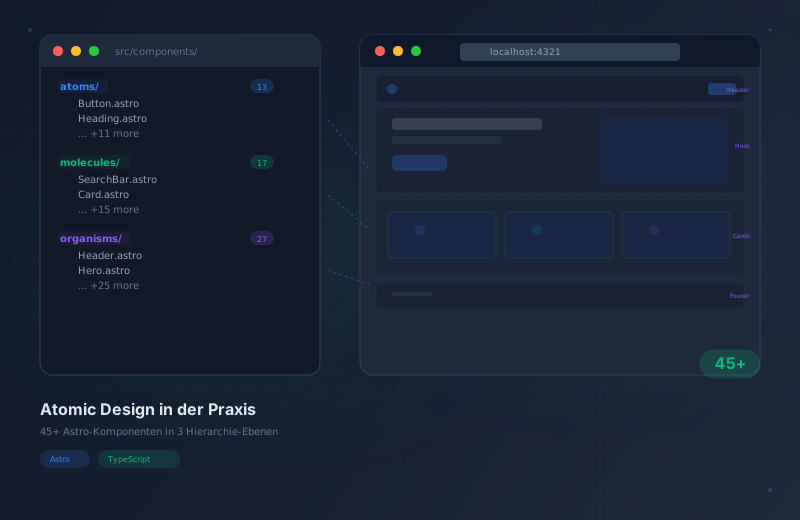
Atomic Design in Practice: 45+ Astro Components

You know the theory behind Atomic Design — atoms, molecules, organisms, templates, pages. We have all read about it, drawn the diagrams, and nodded along. But what happens when you actually implement this methodology in a real project? Not a tutorial with three components, but a multilingual portfolio with over 45 components, 3 layouts, and 106 generated pages?
That is exactly what I did. And I learned things that no theory article will tell you. This post shows you the concrete decisions, the actual folder structure, and the patterns that proved themselves over months of productive work.
Atomic Design sounds simple in theory. The real challenge begins when you have to decide whether something is an atom or a molecule — and you have to make that decision 45 times in a row.
The Numbers: What Actually Got Built
Before we dive into the code, here is an overview of what consistent application of Atomic Design to a real project actually produced.
Indivisible base elements: Button, Heading, Text, Icon, Input, Badge, Image, Link, Tag, Textarea, ThemeToggle, ReadingProgress.
Atom groups with a single purpose: Card, NavLink, FormField, Breadcrumbs, SearchBar, LanguageSwitcher, Pagination, and more.
Self-contained sections: Header, Footer, Hero, Contact, Portfolio, Services, Testimonials, Navigation, and blog components.
These numbers are no coincidence. The distribution — many atoms and molecules, fewer organisms — reflects the natural pyramid that emerges from consistent application of Atomic Design. The base is wide (many small, reusable parts), the top is narrow (few large, specialized sections). If your architecture looks inverted — many organisms, few atoms — something is off with your abstractions.
The Real Folder Structure
Theory articles show you a neat folder structure with five directories and three files each. Reality looks different. Here is the actual structure of my portfolio — every single file.
src/components/atoms/
├── Badge.astro          # Colored tags for categories and status
├── Button.astro         # Primary/Secondary/Ghost, <a> or <button>
├── Heading.astro        # h1–h6, size independent from level
├── Icon.astro           # 68+ SVG paths in one component
├── Image.astro          # Lazy loading, aspect ratio, fallback
├── Input.astro          # Text/email/search with validation
├── Link.astro           # Internal/external link with icon support
├── Tag.astro            # Clickable filter tags
├── Text.astro           # Body text with size and weight variants
├── Textarea.astro       # Multi-line input field
├── ThemeToggle.astro    # Dark/light mode switch
└── blog/
    └── ReadingProgress.astro  # Scroll progress bar
src/components/molecules/
├── Breadcrumbs.astro # Path navigation + Schema.org
├── Card.astro # Universal card: Heading + Text + Button
├── ContactInfo.astro # Address/phone/email block
├── FormField.astro # Label + Input + error message
├── LanguageSwitcher.astro # DE/EN/ES language switcher
├── NavLink.astro # Navigation link with active state
├── Pagination.astro # Page navigation with prev/next
├── ProjectCard.astro # Portfolio card with tags
├── SearchBar.astro # Input + Button + search logic
├── SocialLinks.astro # Icon links to social media
├── TestimonialCard.astro # Client testimonial with avatar
├── TimelineItem.astro # Single timeline entry
├── TrustBadge.astro # Trust indicators
└── blog/
├── CalloutBox.astro # CTA box within articles
├── InfoBox.astro # Note/warning/tip box
├── QuoteBlock.astro # Quote with attribution
└── StatCard.astro # Metric with labelsrc/components/organisms/
├── About.astro # About-me section
├── Contact.astro # Complete contact form
├── FaqSection.astro # FAQ with accordion
├── Footer.astro # Complete footer
├── Header.astro # Header with navigation
├── Hero.astro # Hero section with variants
├── Navigation.astro # Main navigation (desktop/mobile)
├── Portfolio.astro # Project gallery
├── Pricing.astro # Pricing overview
├── Services.astro # Services overview
├── Testimonials.astro # Client testimonials carousel
├── TimelineSection.astro # Work experience timeline
└── blog/
├── CodeTabs.astro # Code tabs for MDX
├── ComparisonTable.astro # Comparison table
├── FaqAccordion.astro # FAQ within blog articles
└── ... # Additional blog organismssrc/layouts/
├── BaseLayout.astro # Foundation: Head + Header + Main + Footer
├── BlogLayout.astro # Blog-specific: TOC + Author + Related
└── PortfolioLayout.astro # Portfolio detail: Gallery + Tech stack
src/pages/
├── index.astro # Homepage (Hero + Services + Portfolio + ...)
├── about.astro # About page
├── contact.astro # Contact page
├── pricing.astro # Pricing page
├── blog/
│ ├── index.astro # Blog overview
│ ├── [slug].astro # Individual blog post
│ ├── page/[page].astro # Pagination
│ ├── tags.astro # Tag overview
│ ├── tag/[tag].astro # Posts per tag
│ ├── categories.astro # Category overview
│ ├── kategorie/[cat].astro # Posts per category
│ └── search.astro # Blog search
└── portfolio/
├── index.astro # Portfolio overview
└── [slug].astro # Portfolio detailNotice the blog/ subfolders within atoms/, molecules/, and organisms/. Blog-specific components like InfoBox, CodeTabs, or ReadingProgress live there, separated from the general UI components. This prevents the main folders from becoming cluttered with context-specific components and makes it clear which parts only make sense in the blog context.
Atoms That Power Everything
Atoms are the foundations of your design system. If an atom is poorly designed, you feel it in every component above. Here are four atoms I built with particular care — and why.
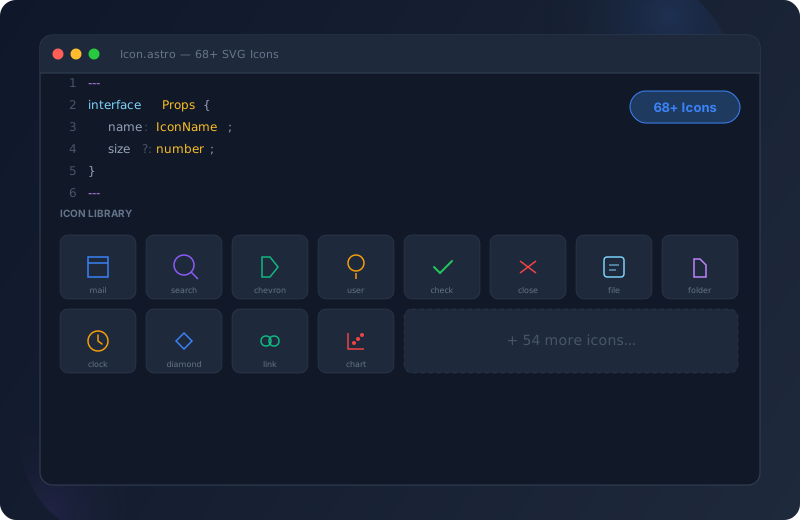
Instead of managing 68 separate icon files, Icon.astro stores all SVG paths in a single switch statement. The atom accepts a name prop of type IconName (a TypeScript union type) and renders the matching SVG path. Size and color are controlled via props. This single atom is imported by NavLink, Button, SocialLinks, ContactInfo, and dozens of other components. A change to the icon system immediately takes effect everywhere.
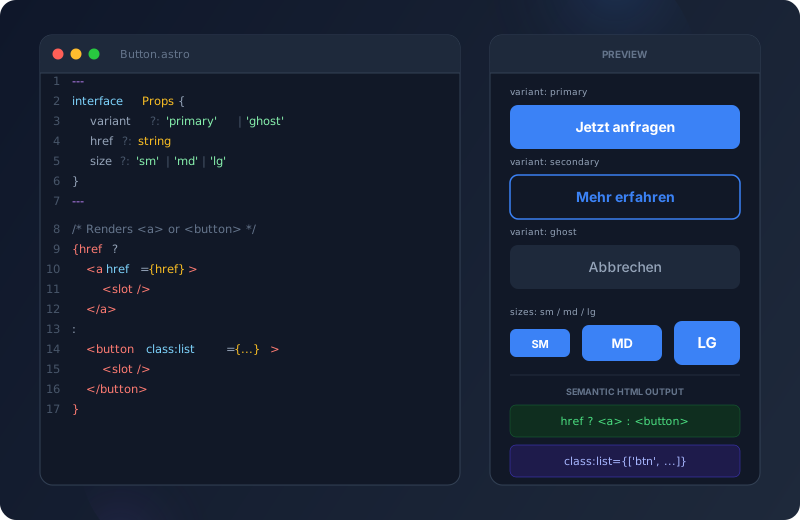
Button.astro renders either an <a> element (when an href prop is present) or a <button> element — decided at build time. On top of that, variant (primary/secondary/ghost), size (sm/md/lg), and an optional icon prop. Astro's class:list attribute conditionally combines CSS classes. A single atom that covers both navigation and forms without sacrificing semantic HTML.
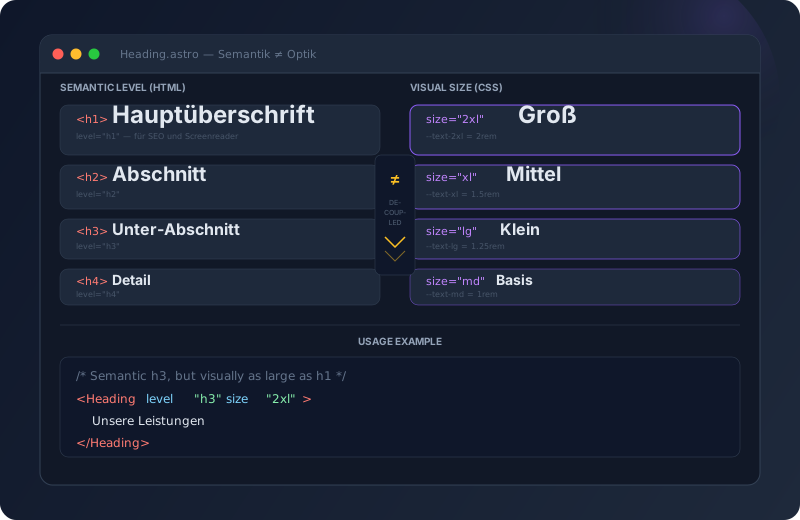
The most common trap in design systems: h2 always looks like h2. Heading.astro separates the level (h1-h6, for semantics and accessibility) from the visual size (sm/md/lg/xl/2xl). This way, a semantic <h3> can be displayed as large as an <h1> — for example, when a section is deeply nested but the title needs to be prominent.
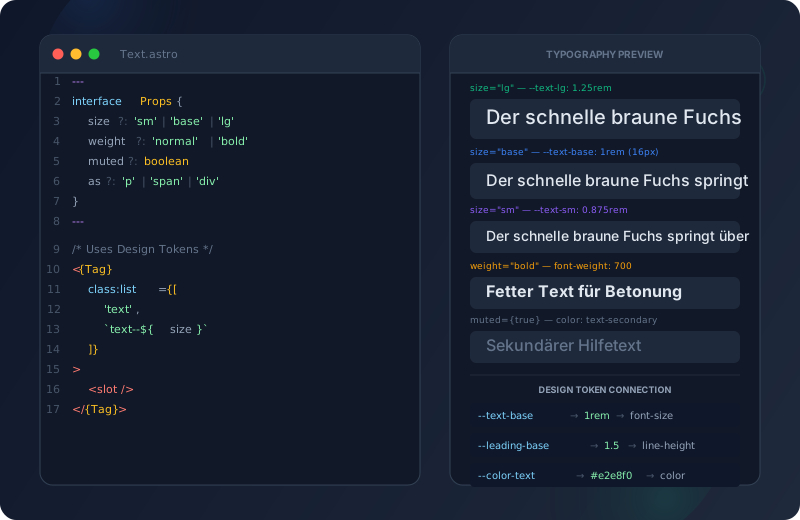
Every body text in the project runs through Text.astro. Props: size (sm/base/lg), weight (normal/medium/bold), muted (boolean for secondary text), and an as prop for the HTML element (p/span/div). Design tokens for font size, line height, and color ensure that a typography change in tokens/typography.css instantly updates the entire project.
Icon.astro in Detail
Because Icon.astro is used by virtually every other component, its design is especially important. Here is a simplified look at its structure:
---
/* Icon atom: Renders SVGs based on a name prop */
import type { IconName } from '../../types';

interface Props {
  name: IconName;
  size?: number;
  class?: string;
  label?: string;    /* For accessibility, when icon stands alone */
}

const { name, size = 24, class: className, label } = Astro.props;

/* aria-hidden when purely decorative, aria-label when meaningful */
const isDecorative = !label;
---

<svg
  xmlns="http://www.w3.org/2000/svg"
  width={size}
  height={size}
  viewBox="0 0 24 24"
  fill="none"
  stroke="currentColor"
  stroke-width="2"
  stroke-linecap="round"
  stroke-linejoin="round"
  class:list={['icon', className]}
  aria-hidden={isDecorative}
  aria-label={label}
  role={label ? 'img' : undefined}
>
  {/* 68+ SVG paths via switch(name) */}
</svg>
---
/* NavLink molecule: Uses Icon atom for optional leading icon */
import Icon from '../atoms/Icon.astro';
import Link from '../atoms/Link.astro';
interface Props {
href: string;
icon?: IconName;
isActive?: boolean;
locale?: 'de' | 'en' | 'es';
}
---
<Link
href={href}
class:list={['nav-link', { 'nav-link--active': isActive }]}
>
{icon && <Icon name={icon} size={18} />}
<slot />
</Link>Molecules: Composing Atoms
A molecule is a group of atoms that together serve a single purpose. That is the key test: if you can describe the group as “it’s a X”, it’s a molecule. “It’s a card.” “It’s a navigation link.” “It’s a search bar.”
Card = Heading + Text + Button + Icon
The Card component perfectly demonstrates how molecules work. It imports four atoms and arranges them in a semantic layout:
---
/* Card molecule: Composes atoms into a reusable card */
import Heading from '../atoms/Heading.astro';
import Text from '../atoms/Text.astro';
import Button from '../atoms/Button.astro';
import Icon from '../atoms/Icon.astro';

interface Props {
  title: string;
  description: string;
  icon?: IconName;
  href?: string;
  buttonText?: string;
}

const { title, description, icon, href, buttonText } = Astro.props;
---

<article class="card">
  {icon && (
    <div class="card__icon">
      <Icon name={icon} size={32} />
    </div>
  )}
  <Heading level={3} size="md">{title}</Heading>
  <Text size="sm" muted>{description}</Text>
  {buttonText && href && (
    <Button variant="ghost" href={href} size="sm">
      {buttonText}
    </Button>
  )}
</article>
---
/* Breadcrumbs molecule: Links with Schema.org markup */
import Link from '../atoms/Link.astro';
import Icon from '../atoms/Icon.astro';
interface Props {
items: BreadcrumbItem[];
}
const { items } = Astro.props;
---
<nav aria-label="Breadcrumb" class="breadcrumbs">
<ol itemscope itemtype="https://schema.org/BreadcrumbList">
{items.map((item, index) => (
<li itemprop="itemListElement" itemscope
itemtype="https://schema.org/ListItem">
{item.href ? (
<Link href={item.href} itemprop="item">
<span itemprop="name">{item.label}</span>
</Link>
) : (
<span itemprop="name" aria-current="page">
{item.label}
</span>
)}
<meta itemprop="position" content={String(index + 1)} />
{index < items.length - 1 && (
<Icon name="chevron-right" size={14} />
)}
</li>
))}
</ol>
</nav>
<!-- Schema.org BreadcrumbList JSON-LD is generated automatically -->---
/* FormField molecule: Label + Input + error message as a unit */
import Input from '../atoms/Input.astro';
import Text from '../atoms/Text.astro';
interface Props {
label: string;
name: string;
type?: 'text' | 'email' | 'tel';
required?: boolean;
error?: string;
helpText?: string;
}
const { label, name, type = 'text', required, error, helpText } = Astro.props;
const inputId = `field-${name}`;
---
<div class:list={['form-field', { 'form-field--error': error }]}>
<label for={inputId} class="form-field__label">
{label}
{required && <span aria-hidden="true">*</span>}
</label>
<Input
type={type}
name={name}
id={inputId}
required={required}
aria-describedby={error ? `${inputId}-error` : helpText ? `${inputId}-help` : undefined}
aria-invalid={!!error}
/>
{error && (
<Text id={`${inputId}-error`} size="sm" class="form-field__error" role="alert">
{error}
</Text>
)}
{helpText && !error && (
<Text id={`${inputId}-help`} size="sm" muted>
{helpText}
</Text>
)}
</div>NavLink: Locale-Aware Active State
A particularly interesting molecule in a multilingual project: NavLink needs to know whether the current path matches the link — while accounting for the locale prefix. /en/blog and /de/blog are both “Blog”, but only one should be marked as active.
Organisms: The Heavy Lifters
Organisms are self-contained sections that feel like real parts of a website. A header is an organism. A footer is an organism. A hero section is an organism. They orchestrate molecules and determine their layout.
---
/* Header organism: Orchestrates navigation, language switcher, theme */
import NavLink from '../molecules/NavLink.astro';
import LanguageSwitcher from '../molecules/LanguageSwitcher.astro';
import ThemeToggle from '../atoms/ThemeToggle.astro';
import Navigation from './Navigation.astro';
import Icon from '../atoms/Icon.astro';
import Button from '../atoms/Button.astro';

interface Props {
  locale?: 'de' | 'en' | 'es';
  currentPath: string;
}

const { locale = 'de', currentPath } = Astro.props;
const navItems = SITE.navigation;
---

<header class="header" id="header">
  <div class="header__inner">
    <!-- Logo -->
    <a href={`/${locale}`} class="header__logo" aria-label="Go to homepage">
      <Icon name="logo" size={32} />
    </a>

    <!-- Desktop Navigation -->
    <Navigation items={navItems} locale={locale} currentPath={currentPath} />

    <!-- Actions area -->
    <div class="header__actions">
      <LanguageSwitcher locale={locale} currentPath={currentPath} />
      <ThemeToggle />
      <Button variant="primary" size="sm" href={`/${locale}/contact`}>
        Contact
      </Button>
    </div>

    <!-- Mobile Menu Toggle -->
    <button class="header__menu-toggle" aria-label="Open menu">
      <Icon name="menu" size={24} />
    </button>
  </div>
</header>
---
/* Footer organism: Composed from Heading, Text, SocialLinks */
import Heading from '../atoms/Heading.astro';
import Text from '../atoms/Text.astro';
import Link from '../atoms/Link.astro';
import SocialLinks from '../molecules/SocialLinks.astro';
interface Props {
locale?: 'de' | 'en' | 'es';
}
const { locale = 'de' } = Astro.props;
const currentYear = new Date().getFullYear();
/* Locale-specific footer links */
const footerNav = SITE.footerNavigation[locale];
---
<footer class="footer" id="footer">
<div class="footer__inner">
<div class="footer__brand">
<Heading level={2} size="md">Arnold Wender</Heading>
<Text muted>Web Developer & Digital Creator</Text>
<SocialLinks />
</div>
<nav class="footer__nav" aria-label="Footer navigation">
{footerNav.columns.map((column) => (
<div class="footer__column">
<Heading level={3} size="sm">{column.title}</Heading>
<ul>
{column.links.map((link) => (
<li>
<Link href={link.href}>{link.label}</Link>
</li>
))}
</ul>
</div>
))}
</nav>
<div class="footer__bottom">
<Text size="sm" muted>
© {currentYear} Arnold Wender. All rights reserved.
</Text>
</div>
</div>
</footer>---
/* Hero organism: Flexible hero with centered/left variants */
import Heading from '../atoms/Heading.astro';
import Text from '../atoms/Text.astro';
import Button from '../atoms/Button.astro';
import Badge from '../atoms/Badge.astro';
interface Props {
title: string;
subtitle?: string;
badge?: string;
variant?: 'centered' | 'left';
primaryCta?: { text: string; href: string };
secondaryCta?: { text: string; href: string };
}
const {
title,
subtitle,
badge,
variant = 'centered',
primaryCta,
secondaryCta,
} = Astro.props;
---
<section class:list={['hero', `hero--${variant}`]} id="hero">
<div class="hero__content">
{badge && <Badge variant="accent">{badge}</Badge>}
<Heading level={1} size="2xl">{title}</Heading>
{subtitle && <Text size="lg" class="hero__subtitle">{subtitle}</Text>}
<div class="hero__actions">
{primaryCta && (
<Button variant="primary" size="lg" href={primaryCta.href}>
{primaryCta.text}
</Button>
)}
{secondaryCta && (
<Button variant="secondary" size="lg" href={secondaryCta.href}>
{secondaryCta.text}
</Button>
)}
</div>
</div>
<slot /> {/* For optional visual content */}
</section>How Hero.astro Enables Flexible Variants
Notice the variant prop in Hero.astro. Instead of building two separate components (HeroCentered and HeroLeft), a single component uses class:list to vary the layout. The CSS in the <style> block then contains .hero--centered and .hero--left modifiers. One organism, two appearances, one single point of maintenance.
The One Rule: Dependencies Flow Downward Only
If there is one rule you take away from Atomic Design, it is this: Never import upward. Atoms import nothing. Molecules import only atoms. Organisms import molecules (and rarely atoms). Layouts compose organisms. Pages use layouts.
What happens when you break this rule? Here is a comparison:
| Aspect | Correct Direction Recommended | Rule Broken |
|---|---|---|
| Import direction | Molecule imports Atom | Atom imports Molecule |
| Dependencies | Clear and linear | Circular and unpredictable |
| Single change | Propagates upward — controlled | Propagates in all directions — chaos |
| Build errors | Immediately localizable | Cascade failures across levels |
| Testability | Atom testable in isolation | Atom needs Molecule needs Organism |
| Refactoring | Replace at one level | Everything must change simultaneously |
| New developer | Understands hierarchy instantly | Must understand entire system |
A Concrete Example
Imagine your Button.astro atom imports Card.astro (a molecule) because the button wants to show a card reference as a tooltip. Now Button depends on Card, but Card already imports Button. Circular dependency. Astro might still compile, but you have created a fragile system where a change to Card can break Button — and thereby every other component that uses Button.
The solution: The tooltip becomes its own molecule (Tooltip.astro) that imports Button and Text. The card uses Tooltip, not the other way around.
Design Tokens as the Glue
Design tokens are the invisible glue between all levels. A color change in :root automatically flows through every atom, molecule, and organism. No manual updating of 45 components. For a comprehensive guide on how to set up and structure your token system, see my article on design tokens as the foundation of every design system.
/* src/styles/tokens/colors.css */
:root {
  /* Primary color — a change here updates the entire project */
  --color-primary-500: #6366f1;
  --color-primary-600: #4f46e5;
  --color-primary-700: #4338ca;

  /* Semantic tokens — mapped to base tokens */
  --color-link: var(--color-primary-500);
  --color-focus-ring: var(--color-primary-500);
  --color-btn-primary-bg: var(--color-primary-600);
  --color-btn-primary-hover: var(--color-primary-700);
}

/* Dark mode — only override semantic values */
[data-theme="dark"] {
  --color-primary-500: #818cf8;
  --color-btn-primary-bg: var(--color-primary-500);
}
/* Button.astro <style> — Atom uses token */
.btn--primary {
background-color: var(--color-btn-primary-bg);
color: var(--color-text-on-primary);
}
.btn--primary:hover {
background-color: var(--color-btn-primary-hover);
}
.btn:focus-visible {
outline: 2px solid var(--color-focus-ring);
outline-offset: 2px;
}/* Card.astro <style> — Molecule uses same tokens */
.card {
background: var(--color-surface);
border: 1px solid var(--color-border);
border-radius: var(--radius-md);
padding: var(--space-6);
}
.card:hover {
border-color: var(--color-primary-500);
box-shadow: var(--shadow-md);
}/* Hero.astro <style> — Organism uses same tokens */
.hero {
padding: var(--space-section-lg) var(--space-4);
background: var(--color-bg);
}
.hero__subtitle {
color: var(--color-text-secondary);
max-width: 60ch;
}
.hero__actions {
display: flex;
gap: var(--space-4);
margin-top: var(--space-8);
}Composition Patterns in Astro
Astro offers four particularly useful patterns for Atomic Design that I consistently use throughout this project. Each pattern solves a specific problem in component composition.
The 4 Composition Patterns
- class:list for Dynamic Classes
Astro's class:list accepts arrays, objects, and strings. Ideal for variants: class:list={['btn', `btn--${variant}`, { 'btn--disabled': disabled }]}. No classnames package needed — Astro handles this natively. Use it in every atom for conditional modifiers.
- <slot /> for Flexible Content
Slots are Astro's content injection mechanism. Instead of passing content as props (error-prone with HTML), use <slot /> for anything that is more than a simple string. Named slots (<slot name="header" />) enable multiple injection points. The Hero atom uses a default slot for optional visual content.
- TypeScript Props Interface
Every component defines an interface Props {} in the frontmatter. This provides IDE autocompletion, compile-time errors for incorrect props, and living documentation. Optional props with defaults: const { variant = 'primary' } = Astro.props; — making the default explicit and the type automatically correct.
- Conditional Tag Rendering
Button.astro renders <a> or <button> based on the href prop. The HTML element is decided at build time: const Tag = href ? 'a' : 'button'. Then: <Tag class:list={classes} {...attrs}>. This ensures semantic HTML without needing two separate components.
Why Slots Are Better Than Props for Layout
A common mistake in design systems: trying to solve everything through props. Imagine an InfoBox that should accept a title, description, and a list of links. With props:
<InfoBox title="Note" description="Consider the following points:" links={[...]} />This works — until someone wants to make a link bold or insert an icon. With slots:
<InfoBox variant="tip" title="Note">
  Consider the following points:

  - **First point** with [a link](/)
  - Second point with an <Icon name="check" size={16} /> icon
</InfoBox>
Slots are more flexible because the content can contain arbitrary markup. Props are better for structured data (title, variant, size). The rule of thumb: Props for configuration, slots for content.
Lessons from the Trenches
After months of working with Atomic Design in a real production project — here are the most important insights that no theory article will tell you.
Build the atoms first. Resist the temptation to start with the hero section. When your atoms are solid, molecules and organisms practically build themselves.
Not every <div> needs to be an atom. If something is only used in a single place and needs no props, it does not need its own component. Abstract only on the second occurrence.
Props for configuration (variant, size, disabled). Slots for content (text, nested components, markup). Slots are more flexible and break less often.
If a component does two different things, split it. FormField does not validate — it only displays the error state. The validation logic lives in a separate utility.
Define tokens before building the first component. Colors, spacing, font sizes, radii, shadows. Everything in :root. Every component references only tokens, never raw values.
Context-specific components (blog InfoBox, blog CodeTabs) belong in a subfolder. This prevents name conflicts and clearly signals: this component only makes sense in the blog context.
The Two-Occurrence Rule
One rule that saved me hundreds of hours: Do not create an abstraction on the first occurrence. If you need a certain button style, hardcode it the first time. When you need it a second time, extract the atom. Why? On the first occurrence, you do not yet know which props you will need. On the second, the pattern is clear.
Exception: Basic atoms like Button, Heading, Text, Icon — you know from the start that you will need these everywhere. Start with those.
Button, Heading, Text, Icon, Input, Badge — the building blocks. In parallel: tokens/colors.css, typography.css, spacing.css. Not a single hardcoded value from the start.
Card, NavLink, FormField, Breadcrumbs, SearchBar — composed from existing atoms. This is where the stability of the atoms was put to the test. Some props needed to be extended.
Header, Footer, Hero, Contact, Portfolio — the large sections. BaseLayout as the frame for everything. This is where the groundwork on atoms paid off: assembly was fast.
InfoBox, CodeTabs, ComparisonTable, FaqAccordion — blog-specific components in the blog/ subfolder. Content Collections for trilingual posts. 106 pages generated.
New requirements uncovered missing props. The Tag atom was created when I needed it for the third time. The LanguageSwitcher was promoted from atom to molecule when it needed to import Icon and Link.
FAQ — Frequently Asked Questions
An atom is indivisible — it makes no sense to break it down further. A button is an atom. A button with a label next to it is a molecule. The test: Can I break this down further without the individual parts losing their purpose? If yes, keep breaking down. If no, it is an atom.
Components are language-neutral — they receive translated text via props or slots. The LanguageSwitcher is an exception: it knows about available locales. But even it receives the current locale as a prop instead of determining it itself. Translations live at the page level or in Content Collections, not in components.
For very small projects (under 10 components), the overhead of the folder structure outweighs the benefits. Also for prototypes or throwaway projects, the strict hierarchy slows you down. Atomic Design shines for medium to large projects that are maintained and extended over months — and for teams that need a shared language for components.
If an organism imports more than 3-4 molecules or exceeds 150 lines, check if you can split it. The Header organism imports Navigation, LanguageSwitcher, ThemeToggle, and Button. That is four children — acceptable. But a "MegaSection" organism with 8 molecules suggests you actually need two organisms.
Yes, but rarely. The main rule is: organisms import molecules. But sometimes an organism needs a single Icon or Heading directly, without a molecule wrapper. That is fine — it is "rarely atoms" according to the rules. Only if you regularly use many atoms directly in organisms, you are probably missing a few molecules.
Astro does not have built-in component previews like Storybook. I create a hidden /dev route (not in the navigation) that renders all atoms with various props. This lets me visually verify whether changes to tokens or atom code produce the expected result. This route only exists in the development environment.
Traditional Components vs. Atomic Design
| Aspect | Traditional | Atomic Design Recommended |
|---|---|---|
| Folder structure | Flat or feature-based | Hierarchical by abstraction level |
| Reusability | Ad-hoc, frequent duplication | Systematic, 85%+ code reuse |
| Consistency | Drifts over time | Enforced through token cascade |
| Onboarding | Every project is different | Universal language (atom/molecule/organism) |
| Refactoring | Unpredictable side effects | Controlled upward propagation |
| Dark mode / theming | Implemented per component | Solved once at the token level |
| Testability | Depends on nesting depth | Each level testable in isolation |
Introducing Atomic Design to a New Project
Implementation Guide
- Define Design Tokens
Start with tokens/colors.css, typography.css, and spacing.css. Establish the entire visual language before building the first component. Use the 8-point grid as the basis for all spacing.
- Build Core Atoms
Button, Heading, Text, Icon, Input — the five atoms you are guaranteed to need everywhere. Each with a TypeScript Props interface, class:list for variants, and exclusively token references in CSS.
- Compose First Molecules
Card, NavLink, FormField — the first combinations of atoms. This is where you discover whether your atom props are flexible enough. Adjust as needed.
- Build Organisms as Sections
Header, Hero, Footer — the large page sections that orchestrate molecules. Each organism gets semantic HTML structure and ARIA landmarks.
- Connect Layouts and Pages
BaseLayout as the frame that wraps all organisms. Pages use layouts and pass data. This is where the circle closes: Token, Atom, Molecule, Organism, Layout, Page.
Conclusion
Atomic Design is not an academic exercise — it is a concrete system that solves real problems. This portfolio with its 45+ components, 3 layouts, and 106 pages would be an unmaintainable mess without the clear hierarchy. The key takeaways:
- Start with atoms and tokens — they are the foundation everything builds upon
- Respect the direction rule — dependencies flow downward only
- Use slots for content, props for configuration — this makes components flexible without being fragile
- Abstract on the second occurrence — not the first, not the third
- Organize context-specific components into subfolders —
blog/keeps the main folders clean
The result: A system where I change a color in a token file and the entire project updates consistently. A system where new pages are assembled in minutes rather than hours, because the building blocks already exist and fit together.