Atomic Design: Component Architecture

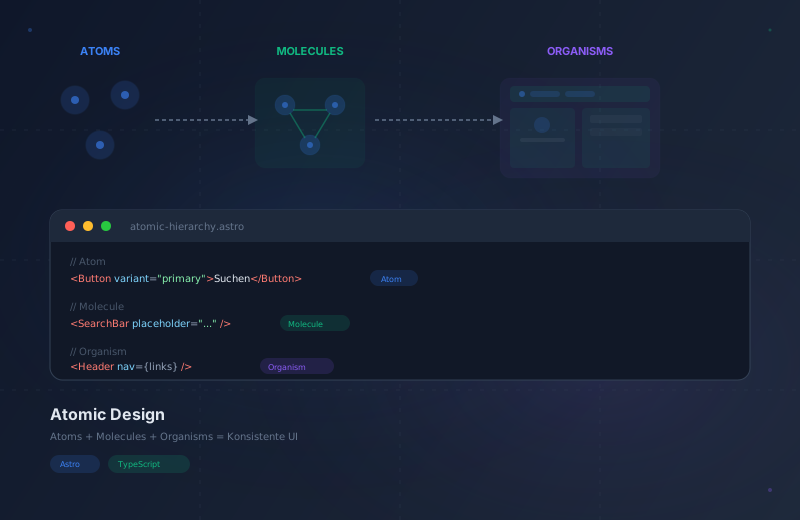
Every frontend team eventually faces the same problem: components multiply, naming conventions drift, and what started as a clean codebase becomes a patchwork of one-off solutions. Atomic Design solves this by giving your component architecture a clear, repeatable structure inspired by chemistry. Instead of guessing where a new component belongs, you follow a hierarchy that scales from a single button to an entire application.
We’re not designing pages, we’re designing systems of components.
What is Atomic Design?
Brad Frost introduced Atomic Design in 2013 as a mental model for building user interfaces. The core idea is simple: just as matter in nature is composed of atoms that combine into molecules, then into complex organisms, user interfaces can be decomposed into five hierarchical levels.
The five levels are Atoms, Molecules, Organisms, Templates, and Pages. Each level builds on the one below it. The critical rule: dependencies only flow downward — atoms import nothing, molecules import only atoms, organisms import molecules, and so on. This single constraint eliminates circular dependencies and makes every component predictable.
The Five Levels at a Glance
The smallest UI building blocks: buttons, inputs, labels, icons, badges. Self-contained, receiving data via props, styled with design tokens.
Functional groups of atoms: SearchBar, FormField, NavLink, Card. Each group serves exactly one purpose.
Complex page sections: Header, Footer, Hero, ContactForm. Manage layout and coordination of their children.
Page layouts that compose organisms into structures. In Astro: BaseLayout.astro, BlogLayout.astro.
Templates filled with real content. The route files in src/pages/ that users see and interact with.
The Five Levels Explained
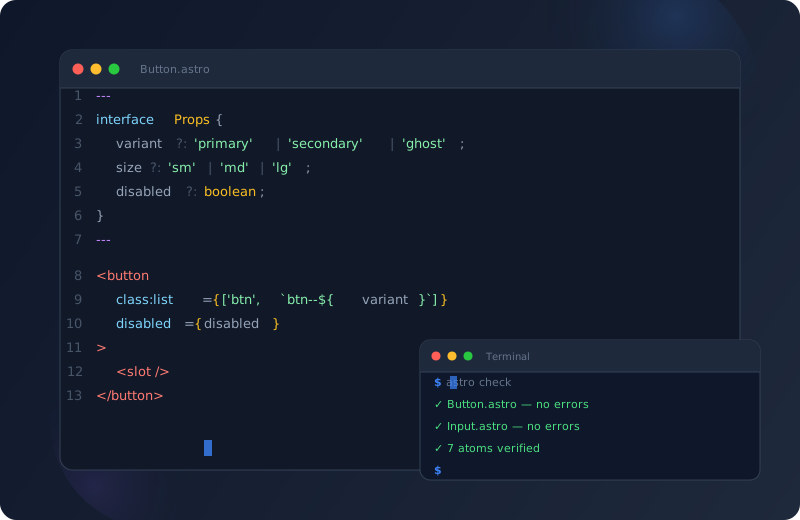
The smallest meaningful UI elements. Buttons, inputs, labels, headings, icons, badges, images, and links. They cannot be broken down further without losing their purpose. Think of them as the periodic table of your design system. Atoms are self-contained — they receive all data through props and style themselves using design tokens.
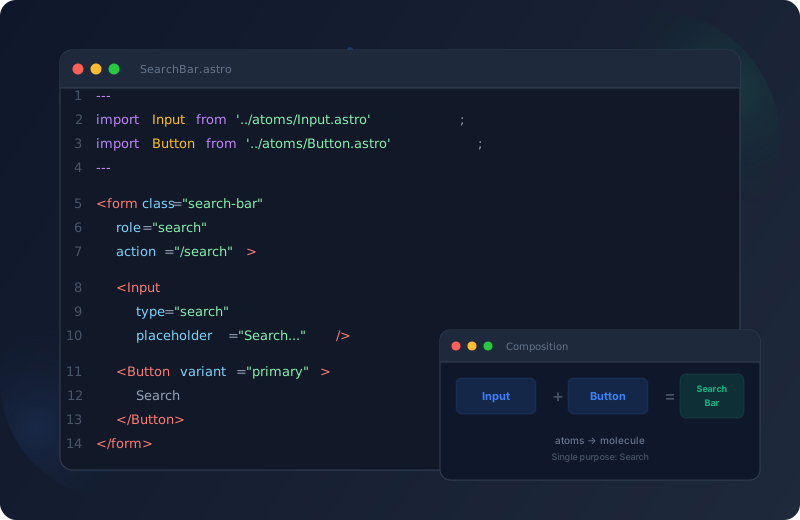
Small groups of atoms working together as a functional unit. A SearchBar (Input + Button), a FormField (Label + Input + Error), a NavLink (Link + Icon), a Card (Image + Heading + Text). The key test: does this group serve a single, clear purpose? If yes, it is a molecule.

Complex, self-contained sections of a page. A Header (Logo + Nav + SearchBar + LanguageSwitcher), a Hero section, a Footer, a ContactForm, a BlogSidebar, a PricingTable. Organisms are the first level that feels like a real "section" of a website. They manage layout and coordination of their children.
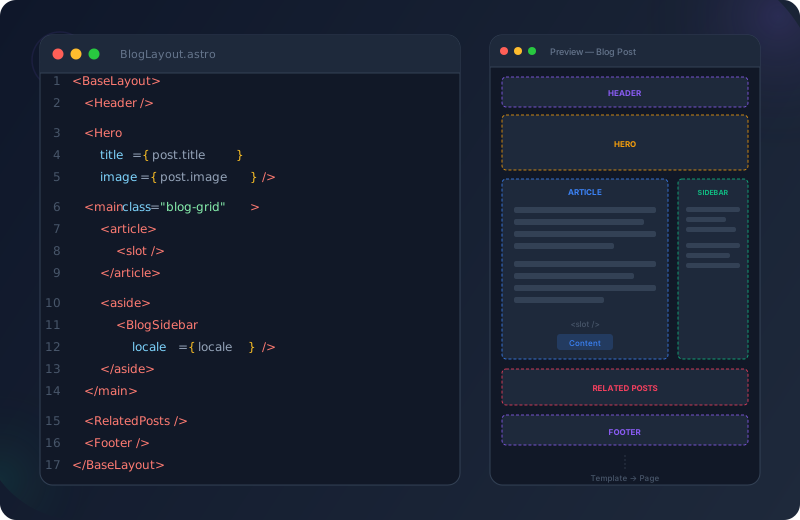
Templates define the page structure — where organisms go, how the layout flows. In Astro, templates map to layout files (BaseLayout, BlogLayout). Pages are templates filled with real content — the actual route files in src/pages/ that users see. Pages handle data fetching and pass it down to layouts and organisms.
Atomic Design vs. Traditional Architecture
| Aspect | Atomic Design Recommended | Traditional Architecture |
|---|---|---|
| Structure | Clear 5-level hierarchy | Flat or arbitrary folders |
| Dependencies | Flow downward only | Often circular and opaque |
| Reuse | Built into the system via composition | Must be actively enforced |
| Creating new pages | Compose existing building blocks | Often build from scratch |
| Onboarding | Hours — structure is self-explanatory | Weeks — every project is different |
| Design-Dev sync | Shared vocabulary | Constant translation needed |
| Testability | Each level testable in isolation | Often only end-to-end possible |
| Scalability | Linear — new pages cost little | Exponential — complexity grows |
Atoms in Practice
Atoms must be self-contained. They receive all their data through props and never fetch data or import other components. They style themselves using design tokens (CSS custom properties), never hardcoded values.
---
interface Props {
  variant?: 'primary' | 'secondary' | 'ghost';
  size?: 'sm' | 'md' | 'lg';
  disabled?: boolean;
}
const { variant = 'primary', size = 'md', disabled = false } = Astro.props;
---
<button
  class:list={['btn', `btn--${variant}`, `btn--${size}`]}
  disabled={disabled}
>
  <slot />
</button>
---
interface Props {
type?: 'text' | 'email' | 'search' | 'password';
name: string;
placeholder?: string;
required?: boolean;
}
const { type = 'text', name, placeholder, required = false } = Astro.props;
---
<input
type={type}
name={name}
placeholder={placeholder}
required={required}
class="input"
/>---
interface Props {
level?: 1 | 2 | 3 | 4 | 5 | 6;
size?: 'sm' | 'md' | 'lg' | 'xl' | '2xl';
}
const { level = 2, size = 'lg' } = Astro.props;
const Tag = `h${level}`;
---
<Tag class:list={['heading', `heading--${size}`]}>
<slot />
</Tag>Molecules: The Functional Glue
Molecules combine two or more atoms into a functional unit. The key distinction: a molecule does something that its individual atoms cannot do alone.
SearchBar = Input atom + Button atom. Together they create a search form that accepts and submits queries. Individually, the input just collects text and the button just triggers an action — neither searches anything alone. The molecule connects them with a <form> element, role="search", and proper action attribute.
FormField = Label atom + Input atom + Error message atom. The molecule connects the label to the input via for/id attributes, displays validation errors below the input, and manages the visual states (valid, invalid, disabled). This is the most common molecule in any application.
Card = Image atom + Heading atom + Text atom + optional Link atom. A content preview unit used for blog listings, portfolio items, team members, and product displays. The molecule handles the layout (vertical stack or horizontal), hover effects, and click behavior (entire card clickable vs. link only).
The Molecule Test
Ask yourself: “Does this group of atoms serve a single, clear purpose?” If yes, it is a molecule. If it serves multiple purposes or contains other molecules, it is probably an organism.
| Component | Molecule? | Why Recommended |
|---|---|---|
| SearchBar (Input + Button) | ✓ Yes | Single purpose: search |
| FormField (Label + Input + Error) | ✓ Yes | Single purpose: collect one field |
| NavLink (Link + Icon) | ✓ Yes | Single purpose: navigate |
| Header (Logo + Nav + Search) | ✗ No | Multiple purposes → Organism |
| Footer (Nav + Contact + Social) | ✗ No | Multiple purposes → Organism |
Organisms: Real Page Sections
Organisms are the first level that feels like a “section” of a page. They are complex, self-contained components made of molecules and atoms.
Organisms manage how their children are arranged — grid, flex, stack. They own the spatial relationships.
They receive data through props from the page level and pass the right pieces to each child molecule.
When one child state affects another (e.g., tab selection shows different content), the organism orchestrates it.
Folder Structure in Astro
Setting Up Atomic Design
- Create the hierarchy
Create folders: src/components/atoms/, molecules/, organisms/, and seo/. Add src/layouts/ for templates and src/pages/ for pages.
- Build atoms first
Start with Button, Input, Heading, Icon, Badge, Image, and Link. These are used everywhere and must be solid before building upward.
- Compose molecules
Combine atoms into SearchBar, FormField, NavLink, Card, and Breadcrumbs. Each molecule imports only from atoms/.
- Assemble organisms
Build Header, Footer, Hero, ContactForm, and BlogSidebar from molecules. Each organism imports from molecules/ (and occasionally atoms/).
- Define layouts
Create BaseLayout.astro and BlogLayout.astro in src/layouts/. These compose organisms into full-page structures with slots for dynamic content.
src/
├── components/
│   ├── atoms/        → Button, Input, Heading, Icon, Badge, Image, Link
│   ├── molecules/    → SearchBar, FormField, NavLink, Card, Breadcrumbs
│   ├── organisms/    → Header, Footer, Hero, ContactForm, BlogSidebar
│   └── seo/          → SEO.astro, Schema components
├── layouts/          → BaseLayout, BlogLayout (= Templates)
├── pages/            → index.astro, blog/[slug].astro (= Pages)
├── styles/
│   ├── global.css
│   └── tokens/       → colors.css, typography.css, spacing.css
├── lib/              → utils.ts, constants.ts
└── types/            → TypeScript definitions
The Golden Rule
Every atom needs: proper prop interfaces, accessible markup, complete state coverage (hover, focus, active, disabled, error), and design token integration. A poorly designed atom propagates its problems everywhere.
Evolution of a Project
Design tokens defined. Core atoms built: Button, Input, Heading, Icon, Image, Link. Global styles and typography established.
Molecules assembled: SearchBar, FormField, Card, NavLink, Breadcrumbs. First organisms started: Header, Footer.
Organisms completed: Hero, ContactForm, BlogSidebar, PricingTable. Base layouts created with responsive grid.
All pages built by composing existing components. New pages take hours instead of days. Design system fully operational.
Frequently Asked Questions
Frequently Asked Questions
It is tempting but leads to monolithic organisms that are hard to test, reuse, and modify. Take the time to identify the molecules inside your organism. A Header is not one big component — it contains a NavLink molecule, a SearchBar molecule, and a LanguageSwitcher molecule.
No. A plain <span> with a class is not an atom — it is just HTML. Atoms represent meaningful, reusable design decisions. If you find yourself creating TextSmall, TextMedium, TextLarge, use a single Text atom with a size prop instead.
That is fine. Atomic Design is a mental model, not a strict rule. A Hero organism might use a Heading atom directly — there is no meaningful molecule between them. Be pragmatic about the hierarchy.
Perfectly. Atoms and molecules are static by default (zero JS). When you need interactivity, wrap a React or Vue island component inside an Astro organism. The Atomic Design hierarchy stays the same — the island is just an interactive atom or molecule.
Yes. The methodology is framework-agnostic. The folder structure and hierarchy rules apply equally to React, Vue, Svelte, or Angular. The only difference: in Astro, atoms and molecules ship zero JavaScript by default, while in React all components are JS-based.
Start with 5-7 core atoms: Button, Input, Heading, Icon, Image, Link, and Text. These cover 80% of all use cases. Additional atoms (Badge, Tag, Divider, Avatar) come when needed.
Why Atomic Design Wins
After applying Atomic Design across more than 30 production projects, these are the benefits that consistently emerge. If you want to see how this methodology plays out in a real codebase with over 45 components, read Atomic Design in Practice.
New developers understand the architecture in hours, not weeks. The folder structure tells them exactly where every component lives.
Every page uses the same building blocks, eliminating visual drift. One Button, one Card, one Header — everywhere.
Atoms can be tested in isolation, molecules with mocked atoms, organisms with mocked molecules. Each level has a clear testing boundary.
Small, focused components enable tree-shaking and selective hydration in Astro. Only interactive islands ship JavaScript.
Adding a new page type means composing existing components, not building from scratch. The system grows without growing complexity.
Designers and developers share the same vocabulary and hierarchy. A "molecule" in Figma is a molecule in code.